Commodity Login to MT5 Commodity Trading Account
Login to a MT5 Commodity Trading Account Procedure
Before placing any commodity trade on the Commodity Account MetaTrader 5 Commodity Trading Platform Trading Account, you will be required to login to your MT5 commodity trading account using your MT5 Commodities Trading Account Login Number & Password details.
To sign in & start commodities trading in MT5 platform, just click on 'File', then choose & click 'Login' button key from the file drop-down menu as illustrated and shown below.
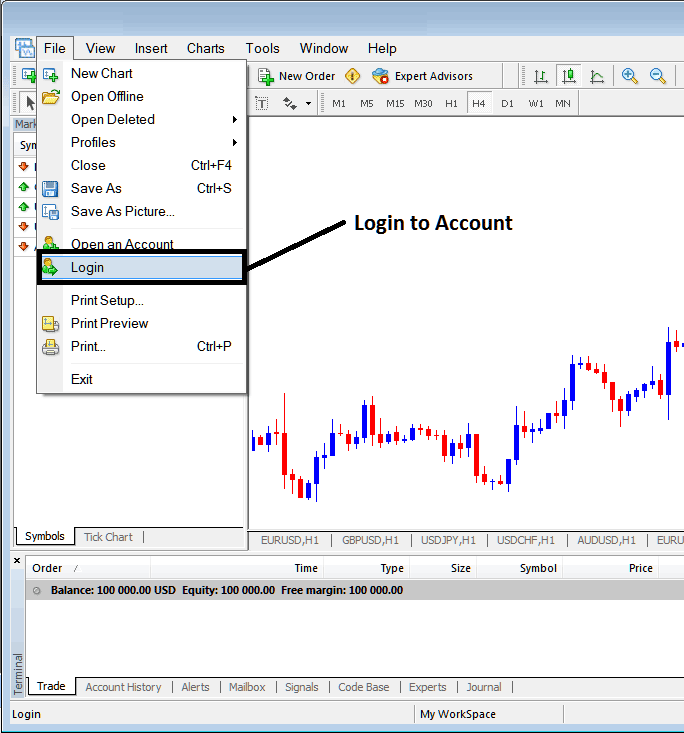
How to Login to Commodity Trading MT5 Platform Commodity Trading Account
As a trader once you click this MT5 commodities trading platform sign in button key, then a pop up window panel will pop-up prompting you to in put your MT5 Commodity Trading Account Login and MT5 Commodities Account Password as illustrated & shown below:
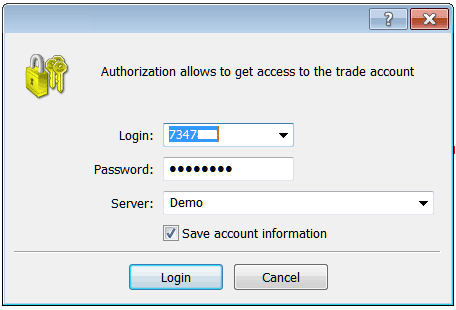
MetaTrader 5 Commodity Trading Platform Account Sign in
Once you input your MT5 Login and Password you will then have to select the MT5 server: because this is a demo commodity trading practice account, for this instance you will then select 'Demo', if it was a real commodities account - live commodities trading account then you would have to select 'Real' Server on this option by clicking the drop-down arrow on the right side of the text box shown above.
Then tick the box "Save the Account Information Data" in the MetaTrader 5 Panel Shown above.
Then Click 'Login' button on the MT5 Window shown in the commodities trading example above.




