Commodity Trading Pivot Points Analysis & Commodity Trading Pivot Points Signals
Pivot Points Commodities Trading Indicator consists of a central commodity pivot which is surrounded by 3 resistance areas above and Three support areas below the center pivot.
Pivot Points Commodities Trading Technical Indicator is considered to be leading technical indicator.
Pivot Points Commodity Trading Indicator provides a quick method for traders to analyze the general commodity trend and analyze how the commodities trading market is going to be moving during the day. A few calculations are used to draw the resistance and support levels for the pivot point indicator.
To calculate these support & resistance areas for the coming trading day - the previous day's
- high,
- low, and
- closing commodity prices are used
The commodity trading day closes at 5:00PM EST & this daily closing time is when the Pivot Points Commodities Indicator is updated.
24-hour cycle for this Pivot Points Commodity Trading Indicator are calculated using a complex formula - the central commodity pivot is then used to calculate the support & resistance areas as follows:
Resistance Level 3
Resistance Level 2
Resistance Level 1
Commodity Trading Pivot Point Technical Analysis
Support Level 1
Support Level 2
Support Level 3

Technical Analysis in Commodities Trading
Pivot Points Commodity Trading Indicator can be used in different techniques to generate trading signals. Following strategies are the most oftenly used technical analysis strategies:
Pivot Points Commodities Trading Technical Indicator Trend Identification
The central commodity pivot point is used by traders to determine the commodity trend direction. The commodities trades opened by traders will only be in direction of this commodities trend.
- Buy commodity signal - bullish commodity trend - commodity price is above the central commodity pivot point
- Sell commodity signal - bearish commodity trend - commodity price is below the central commodity pivot point
Pivot Points Commodity Trading Indicator Price Break-out Signals
Commodity Trading price break-out signals are generated as follows
- Buy commodity signal is generated when the price breaks upwards through the central commodity pivot point.
- Sell commodity signal is generated when the price breaks-out downward through the central commodity pivot point.
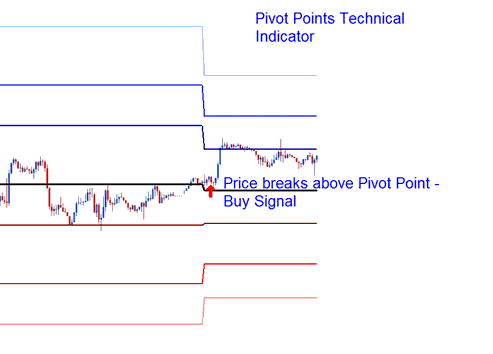
Pivot Points Commodity Technical Indicator Price Break-Out
Pivot Points Commodity Trading Indicator Price Reversal Trading Signal
Pivot Points Commodity Technical Indicator Trading Commodity Price reversal trade signals are generated as follows
Buy commodity signal - when price moves downwards towards one of the pivot point support area, then touches support levels or moves slightly through this support area then quickly reverses and moves upward.
Sell commodity signal - when price moves up towards one of the pivot points resistance area, then touches resistance area or moves slightly through this resistance area then quickly reverses and moves downwards.

Pivot Points Commodity Trading Indicator Price Reversal Trading Signal
Setting Stoploss & Take Profit Commodity Trading Order Levels
The central commodity pivot-point & the other support levels & resistance levels of this pivot points indicator are used by traders to determine suitable commodity stop loss setting levels and commodity take profit areas.
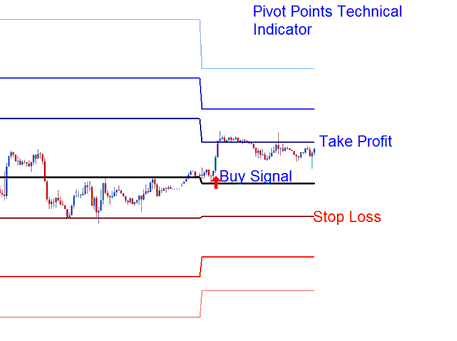
Setting Commodity Trading Stop Loss Trading Order Levels and Setting Take Profit Commodity Trading Order Levels
If a buy order is placed above the central commodity pivot point the Resistance Level 1 or Resistance Level 2 can be used to set the take profit level, and the Support Level 1 can be used to set the StopLoss Commodity Trading Order Level for the commodity trade.
To download Commodity Trading Pivot Points MetaTrader 4 Indicator: https://c.mql5.com/21/9/pro4x_pivot_lines.mq4 Once you download the Pivot Points Commodities Trading Indicator - open the indicator with MQL4 Language Editor, Then Compile Pivot Points MetaTrader 4 Commodity Trading Indicator by pressing the Compile Button and Pivot Points MetaTrader 4 Commodity Trading Indicator will be added to your MetaTrader 4 platform. NB: Once you add Pivot Points MetaTrader 4 Commodity Trading Indicator to your MetaTrader 4, the indicator has additional lines named Mid Points, to remove these additional Pivot Points MetaTrader 4 Commodity Trading Indicator lines open MQL4 Language Editor(shortcut keyboard key - press F4), and change line 16 from: extern bool midpivots = true: to extern bool midpivots = false: Then Press Compile again, and Pivot Points MetaTrader 4 Commodity Trading Indicator will then appear as exactly shown on this learn commodity web site.




