MT4 Login Authorization
Once you start your MT4 commodities trading platform you'll have to log in to your demo commodity trading account or real commodities trading account - this is known as MT4 Login Authorization. For MT4 Login Authorization, click on file then click login
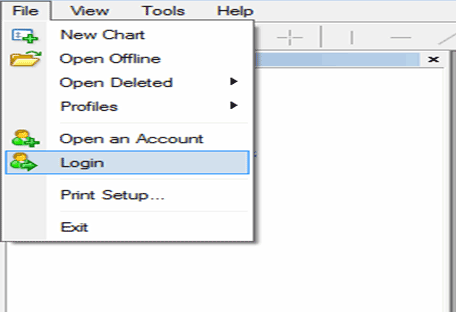
The following pop up appears
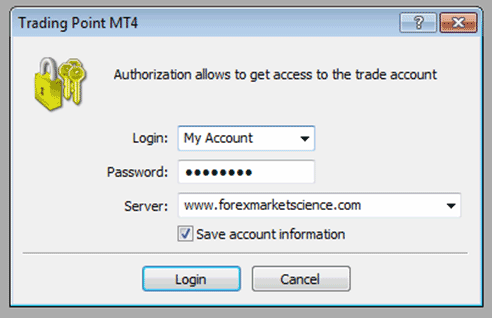
Log in to Account - MT4 Login Authorization
Specify your commodity account number & password, the server you can select using the down arrow. Tick the 'save log in information' & click login - Commodity MetaTrader 4 Sign in. This is known as MetaTrader 4 sign in authorization, every time before trading you will have to perform authorization on the MT4 platform. Sometimes the commodity trading platform authorization procedure may fail - Commodity Platform MT4 Login Authorization Failed - MT4 Login Problem. MT4 Login Authorization Failed - MT4 Login Problem is explained below.
MT4 Login Problem
If the MT4 Login Authorization Failed - MT4 Login Problem while you were trying to login to your commodities trading account you will need to check if you typed the correct MT4 Login Number as well as the correct Login Password. You can try to retype again the commodity log in credentials - commodity account number & commodity account password to try & see if this solves the MT4 Sign in Authorization Failed - MetaTrader 4 Sign in Problem Error.
You can also check to confirm that on your MT4 commodities trading platform you're using the correct MT4 Server for your commodities software - if you are trading on a practice commodity trading account then confirm the demo server is selected and if you are using a real commodity trading account then confirm the real server is selected in the MT4 commodity login window below Account Login and Account Password Form Field.
If you still get this error - Commodity Platform MT4 Login Authorization Failed - MT4 Login Problem - you can try to restart your MT4 commodities platform and then retype your commodities account log in credentials using the procedure explained above.
If you are using a commodity trading demo account you can also register for a new demo commodities trading account and get a new commodity trading demo account that has new commodities account log in credentials - Commodity Account Number and Password & you as a trader can use this new Demo commodities account to login to MT4 platform.
If you are using a commodity trading real MT4 commodity trading account then you can change your commodities trading account login details from your My Client Area - Secure Client Area - Commodity Trading Cabinet on your commodities trading broker website and then use new commodities trading account login details to login to the commodity MetaTrader 4 software.




