Analyze and Save a MetaTrader 4 Commodity Profile in MetaTrader 4 Platform
How Do You Trade Commodity Trading and Save a MT4 Commodity Profile in MetaTrader 4 Platform?
How Do You Save a Commodity Trading Chart Profile? - MT4 commodity chart Default Chart Template - MetaTrader 4 Default Template
Open the commodity charts you wish to create a profile for on MetaTrader 4 platform. Once you setup the commodities charts & you are ready to save these MetaTrader 4 commodity charts as a commodity chart template.
- Click "File" Menu.
- Select "Profiles".
- Select "Save Profile".
- Enter the name of the "New Profile".
MT4 Default Template
In MetaTrader 4 commodity trading software, you may want to save a workspace that you've opened, especially if you've come to a learn commodity tutorial site like this one that has shown you how to place commodity indicators & how to open many commodity charts & put various commodity trading tools on these commodities charts and you want to continue the next time from where you left of, then this saving your commodity platform profile work-space guide will explain to you how to do it.
To save a work space on MetaTrader 4 commodity trading platform you'll use the "Profiles" button, which is fourth selection on the "File" dropdown menu list - this MT4 commodities software button is shown below:
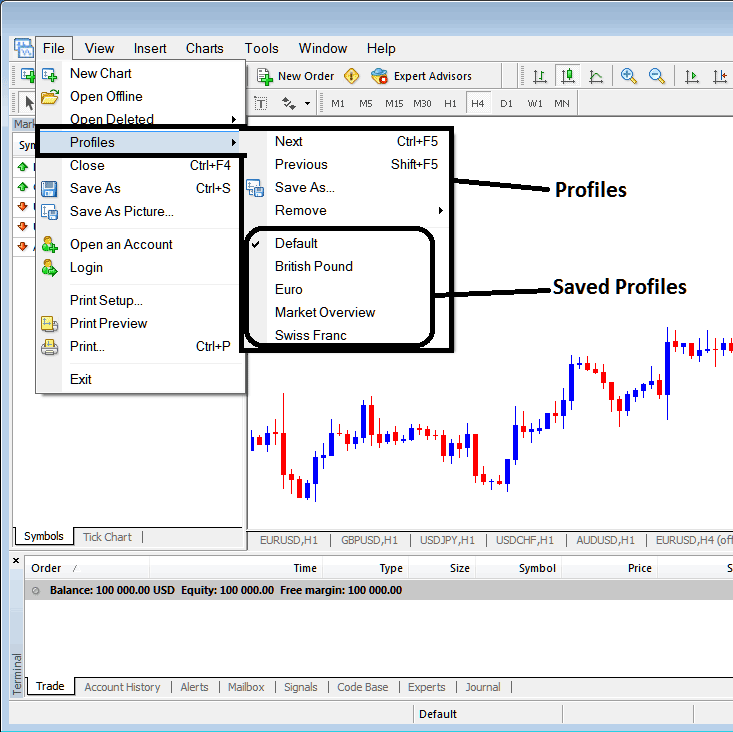
Interpret & Save a MetaTrader 4 Commodity Profile in MetaTrader 4 Software?
From the above profile button, once you click this button on the MetaTrader 4 platform, another sub menu appears to the right as shown above, to save your current work space on MT4 platform as a profile, click the "Save As" button shown above on the MetaTrader 4 platform and name your profile, for examples you can call it "My Workspace"
Example of how to save a MetaTrader 4 Commodities Trading Chart profile named "My Workspace"
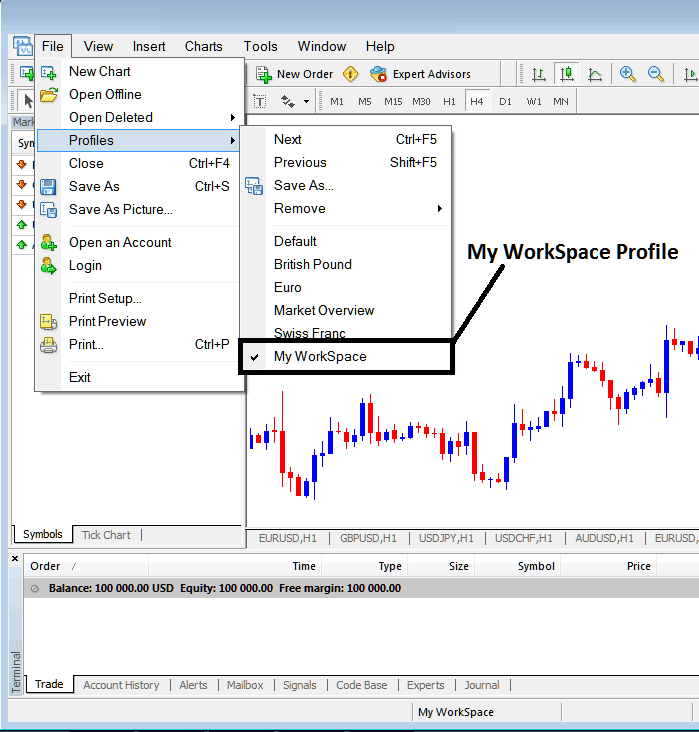
How Do I Trade Commodity Trading and Save a MT4 Commodity Profile in MetaTrader 4 Software?
From this learn commodity MetaTrader 4 tutorial, now as a trader you have learned how to save a MetaTrader 4 work space using the profiles button on the MetaTrader 4 platform, under the file drop down menu and you can now save as many MetaTrader 4 commodity chart profiles as you want on yourMT4 commodities trading platformand then select any of these saved profiles any other time that you may need to trade with them on other commodity charts that you're trading with.
Interpret and Save MetaTrader 4 Commodity Profile in MetaTrader 4 Software?




