Commodity Trading Platforms for Windows
MT4 Commodity Trading Software
The most popular platform is MT4 platform. It is easy to use, chart are well presented and the software has multiple technical analysis tools for a trader to choose from - Commodity Trading Platforms for Windows PC. This is why the MT4 is the best commodity trading platform.
The commodity trading platform also known as commodity trading software displays commodity charts on the computer screen: these charts show the current buy & sell commodity prices. The commodity platform helps you keep track of your funds and how the commodity trade which you bought or sold is doing.
The examples shown below shows the Trading Interface of the Commodity Trading Platforms for Windows PC used to draw commodity charts, streaming commodity price quotes & placing commodity orders with your selected online commodity broker.
Commodity Trading Platforms for Windows - Online Commodity Software
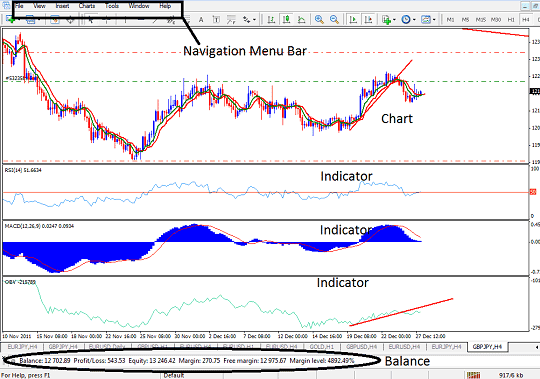
MetaTrader 4 Commodity Trading Software
The easiest commodity trading platform to use is the MT4, also known as MetaTrader 4. MT4 Commodities Trading Software can be downloaded from any online commodity broker.
If you are new to commodity platforms all you need to remember is that all computer software use the same coding rules, programming rules are followed by all programmers, one of the rules used is familiarity.
So in all software take for example your webbrowser, there is file, edit, view, history, tools & help at the top left side of your browser.
If you compare this with your commodity platform if you are using MetaTrader 4 oftenly referred to as MetaTrader 4 there is file, view, insert, charts, tools & help.
MetaTrader 4 Commodity Trading Platform Navigation Menu
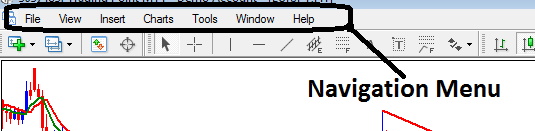
MT4 Navigation Menu
Under file in MT4 you can open charts for the commodity you want, you can open an account, or login to an account and so on.
- Use 'New Chart' button key to open a commodity chart
- Use "Open an Account" button to open a practice demo commodity trading account
- Use 'Login' button to login to an account
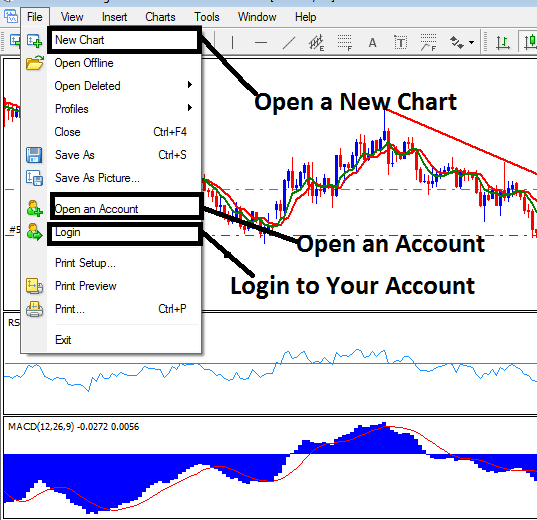
How to Open an Account on MetaTrader 4 Commodity Trade Platform
Under view menu you can open the navigator to view your trading account number details plus indicators. To use the indicators just double click them and click okay. They will automatically be placed on the commodity price chart.
Still under view you can click the 'terminal' button to view open trades.
To open a trade right click inside the chart, click trading select new order the you can choose to buy or sell that commodity.
If anything else gets complicated just click on help button & look for it in the 'Help Topics'.
Commodities Trading MT4 platform can be downloaded from various commodity broker websites.
The MT4 is so easy to learn as a beginner trader can learn the platform within minutes, this is why the MT4 is considered as one of the best commodity trading platforms if not the best commodity platform to practice and train with.
MT4 commodities software trading tutorials can be found on the section: MT4 Commodity Platform Tutorial




