How to Draw Fibonacci Extension on Up Bitcoin Trend
How Do I Draw Fibonacci Extension for Bitcoin Uptrend?
We use Fibo Extension Levels to estimate where the bitcoin trend movement will reach. There are 2 commonly used Fibo Extension areas: 61.80% BTCUSD Trading Fib Extension Level & 100% Fibonacci Extension Level, these Fibonacci Extension Levels are used for setting take profit areas.
On the Fibonacci Extension indicator example illustrated below you can see that the Fibonacci Extension technical indicator tool is plotted along the direction of the bitcoin trend, since the bitcoin trend is up - the Fibo Extension technical indicator is plotted upward.
These Fibonacci Extension levels are shown as horizontal lines above the Fibonacci Extension technical indicator, showing the profit taking areas. In the cryptocurrency trading example illustrated below if you had used of 100.0% Fibo Extension level you would have made good profit from using this trading setup.
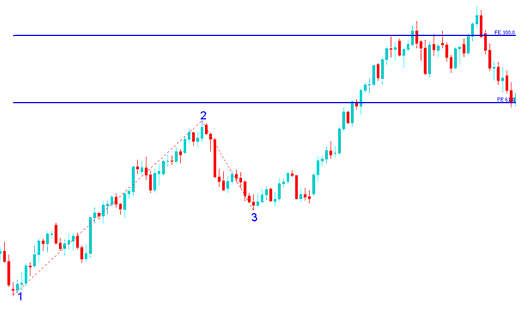
How to Draw Fibo Extension on Up Crypto Trend
From the above Fibonacci Extension indicator tool example, the upward bitcoin trend continued & both 61.80% & 100.0% Fibo Extension levels were all hit after which the bitcoin trading price retraced again after getting to the 100.00% Fibonacci Extension level.
From the Fibo Extension tool examples above, after plotting this Fibo Extension tool there are two levels that are used to show the profit taking areas, these two Fibo Extension areas are plotted as horizontal lines across the cryptocurrency chart marked as 61.8% BTCUSD Fib Extension Level & 100% Fibonacci Extension Level.
Explanation of How to Draw Fib Extension Levels on Cryptocurrency Charts
We use Fibo Extension Levels to estimate where the bitcoin trend movement will reach. There are Two important Fibo Extension areas: 61.80% & 100% Fibo Extension Areas, these are used for taking profit.
To draw Fibo Extension levels on the cryptocurrency chart we wait until the bitcoin price retracement is complete and the bitcoin price starts to move in the original direction of the Bitcoin trend. Where the bitcoin trading price retracement reaches is used as chart point 3. Fibo Extension Technical Indicator is plotted using 3 chart points as illustrated on the cryptocurrency trading example illustrated below of how to draw the Fibo Extension Technical Indicator Tool.
The Fibonacci Extension example illustrated below shows the 3 Chart Points where the Fibo Extension technical indicator is plotted, marked as Chart point 1, Chart point 2 & Chart point 3.
Chart point 1 is where the bitcoin trend started, Chart point 2 is where the bitcoin trend pulled back & retraced & Chart point 3 is where the cryptocurrency retracement reached as shown on the Fibonacci Extension Technical Indicator Tool example illustrated below.
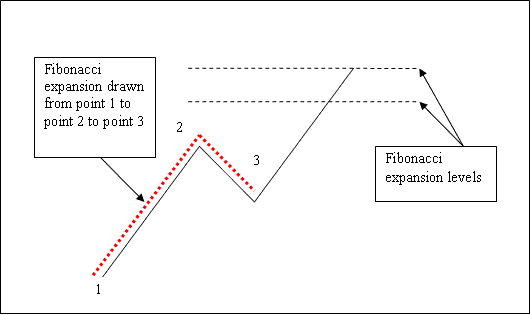
How to Draw Fibo Extension Crypto Technical Indicator Tool on Upwards Crypto Trend
Please note where these Fibo Extension areas are plotted - Fibo Extension levels are drawn above the Fibo indicator, these are the chart points where a trader will set the takeprofit orders using these Fibonacci Extension Levels - 61.80% & 100.00% Fibo Extension Areas.