Trading Stock Set Buy Stop Stocks Order & Sell Stop Stock Order on MetaTrader 4 Platform
How to Set Buy Stop Stock Orders and Sell Stop Stock Orders on MetaTrader 4
Setting Buy & Sell Stop Stock Orders in MetaTrader 4 Software
Open a stock trading Stocks Chart - Right Click on the Stocks Chart, Select New Order, then Follow the steps below:
Step1: Choose Pending order as illustrated below
Step2: Choose Pending order Menu as Show below
Step3: Select Buy Stop Stocks Order or Sell Stop Stock Order
Step4: Click "Place" Order
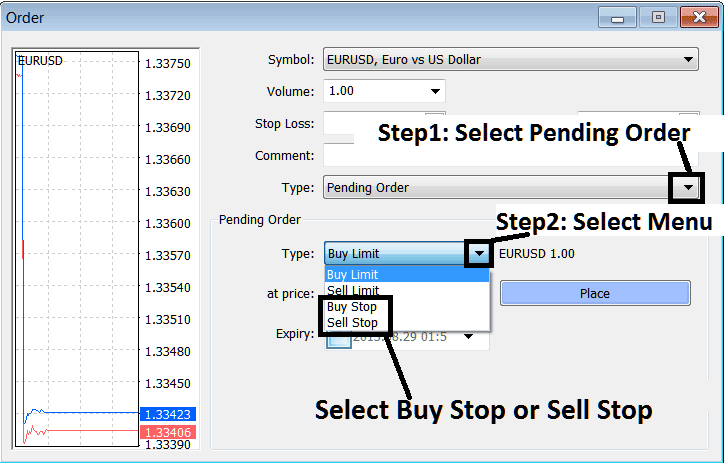
Steps to Setting Pending Stock Orders on MetaTrader 4
Entry Stop Stocks Orders Stocks Orders
These are pending stocks orders to buy above the stocks market or to sell below the stocks market.
- Buy Stop Stock OrderAn order to buy at a level above the stocks price.
- Sell Stop Stocks OrderAn order to sell at a level below the stocks price.
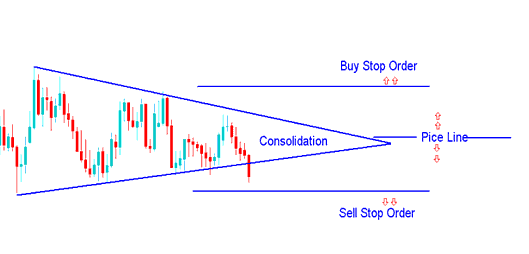
Buy Entry and Sell Entry Stock Order - Stocks Pending Orders
These pending stocks orders are used by traders wanting to trade a setup like consolidation chart pattern but they do not want to wait & watch the stocks prices all day long until there is a stocks price break-out. Therefore traders will set these pending stocks orders above & below the stocks price and a breakout in any of these direction will execute one of these pending stocks orders & a buy stocks trade or a sell stock trade will automatically be opened.
Buy Stop Stock Order
In the example explained & shown below a buy stop order was placed to buy at a level above the current market stocks price.
The stocks price then went up to hit the order, & afterwards stocks price continued to move upward.
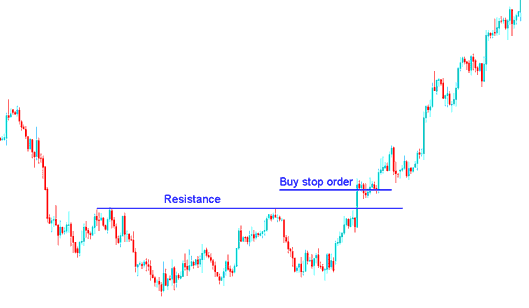
Placing Buy Stop Stocks Order above Resistance Level - Buy Stop Stocks Order Pending Order
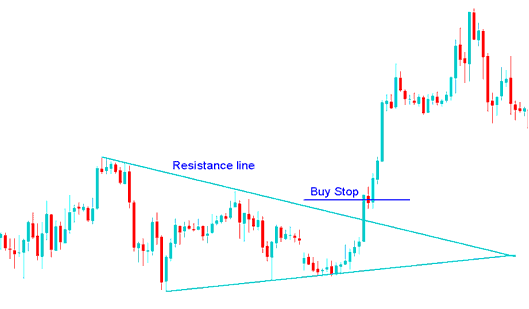
Placing Buy Stop Stock Order in a Stocks Breakout - Buy Stop Stocks Order Pending Order
A Buy trade was generated from the above pending stocks order when the price broke a resistance line in the first example & when there was an upward break out after a stocks market consolidation.
Sell Stop Stocks Order
In the stocks example illustrated and explained below a sell stop order was placed to sell at a level below the current market stocks price.
The stocks price then went down to hit the order, & afterwards the downward move continued
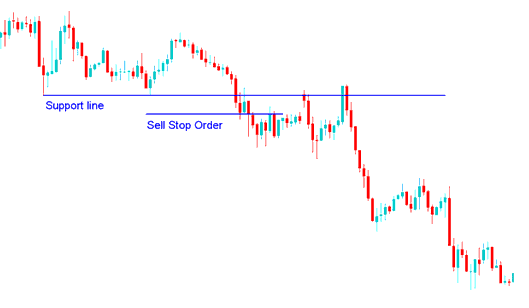
Setting a Sell Stop Stocks Order Below a Support Level - Sell Stop Stocks Order Pending Order
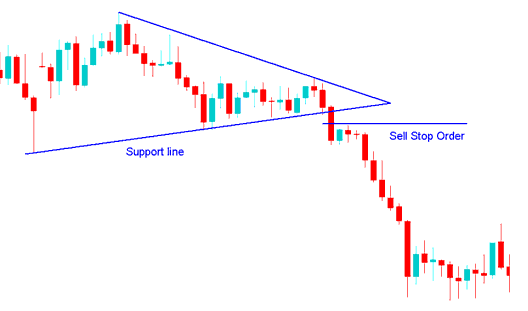
Pending Sell Order Set in a Stocks Price Break-out - Sell Stop Stocks Order Pending Order
A Sell trade was generated from the above sell stop order after support line is broken after consolidation chart pattern.




