How to Add MT5 Aroon Indicator in MetaTrader 5 Charts
Step 1: Open MetaTrader 5 Platform Navigator Panel
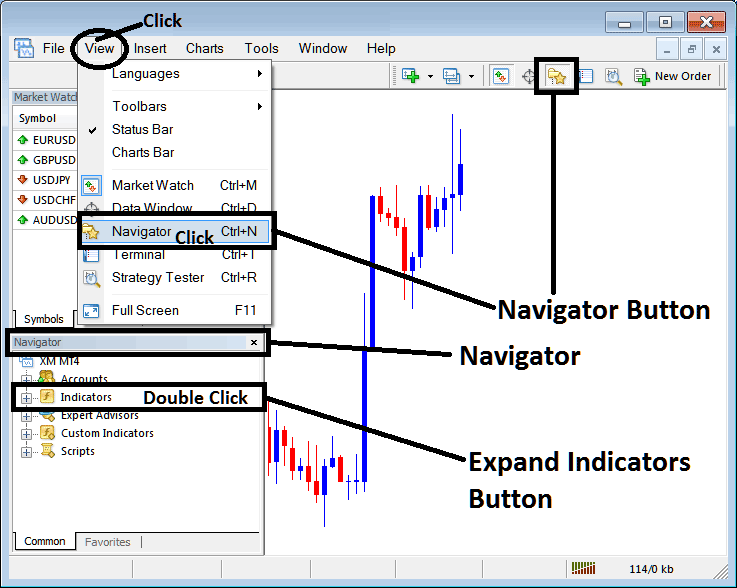
Open MetaTrader 5 Navigator window as explained on the MT5 example below: Go to "View" menu (click), then choose the "Navigator" window (click), or From Standard Tool Bar click the "Navigator" button or press keyboard MT5 shortcut keys "Ctrl+N"
On MT5 Navigator window, select "Indicators", by Double Clicking
How Do You Use MT5 Aroon Technical Indicator in MT5?
How to Add Aroon MT5 Indicator
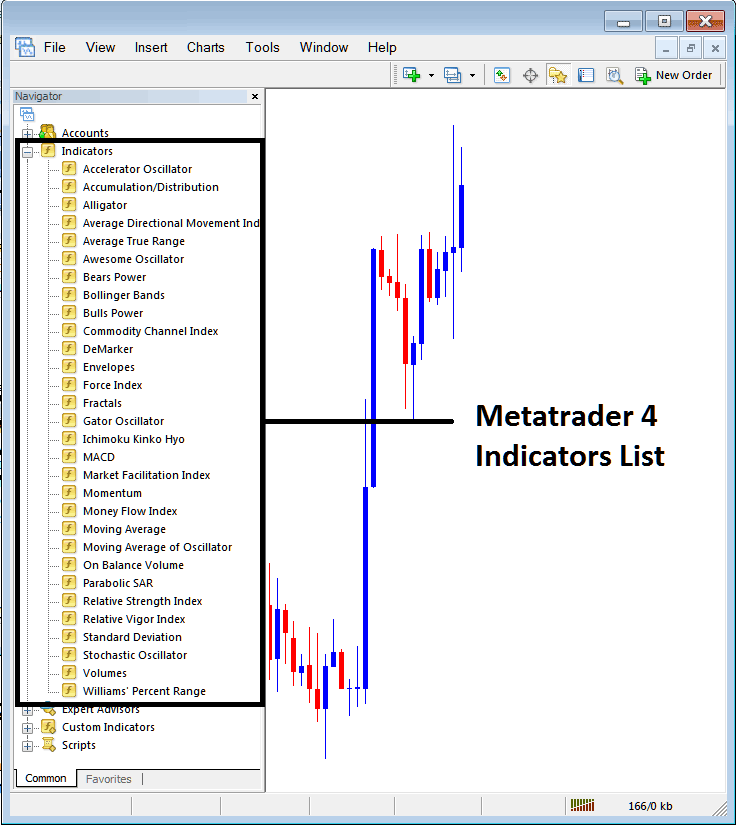
Expand the menu by clicking the expand button (+) or double click the "indicators" menu, after this the button will be displayed as (-) and will now display MT5 indicators list as explained on the MT5 example below - select the Aroon technical indicator from this list of MT5 indicators so that you can add the Aroon MT5 technical indicator on the MT5 forex chart.
How Do You Use MT5 Aroon Technical Indicator in MT5?
How to Place Forex Custom Aroon Indicator in MetaTrader 5 and How to Install Aroon Indicator MT5
If the MT5 indicator that you want to add on the MT5 charts is a custom MT5 technical indicator - for example if the Aroon technical indicator that you want to add is a custom MT5 technical indicator you will need to first add this custom Aroon MT5 technical indicator on the MT5 platform & then compile custom Aroon technical indicator so that the newly added Aroon MT5 custom indicator pops up on the list of custom technical indicators on the MT5 software.
To learn how to add Aroon indicators on MT5 platform - how do you add Aroon indicator window to MT5 platform? - how do you add Aroon forex custom indicator on MT5 platform? - How to add custom Aroon custom forex indicator on MT5.
How Do You Use Aroon MT5 Indicator?
Aroon Indicator Forex Technical Analysis Buy & Sell Signals
Developed by Tushar Chande
Aroon MT5 technical indicator is used to determine if a instrument is trending or not.
Aroon MT5 technical indicator is also used to indicate how strong the forex trend is.
Aroon MT5 technical indicator is also used to identify the beginning of a forex trend - thus its name which means morning or dawn.
Aroon MT5 technical indicator has two lines:
- Aroon UP
- Aroon DOWN
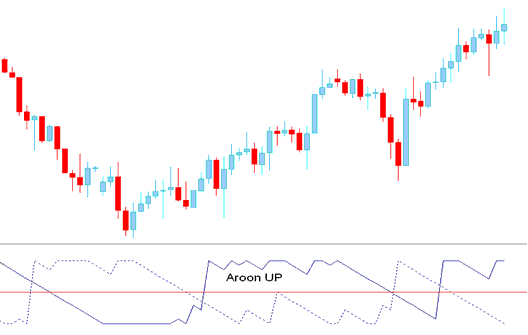
Aroon UP
Percentage of time between the start of a forex chart time period and the highest point that forex price has reached during that forex chart time period.
If forex price sets a new high, Aroon UP will be 100 - for each new forex price high it will stay at 100. However, if forex price moves down by a certain percentage - then that percentage is subtracted from the 100 and Aroon UP forex indicator line starts to move down. This means that if Aroon UP indicator line stays at 100 then forex price is making new highs but when it starts to move down then forex price is not making new highs.
If however forex price is making new lows for a particular forex chart time period then Aroon UP forex indicator line will be at zero
How to Add MetaTrader 5 Aroon Indicator in MetaTrader 5 Charts
Aroon MT5 technical indicator Calculation
Aroon UP forex indicator line is a percentage of time between forex chart time period and highest point.
If you use 10 forex price periods for calculation:
For Example: Highest forex price was 1 day ago
Then if the highest point was yesterday, 1 day before then
10 forex price periods minus 1 day= 9
9/10 in percent terms = 90
Aroon UP will be at 90
Forex Example 2: Highest forex price was 5 days ago
If the highest point was 5 days ago then
10 forex price periods minus 5 = 5
5/10 in percent = 50
Aroon UP will be at 50
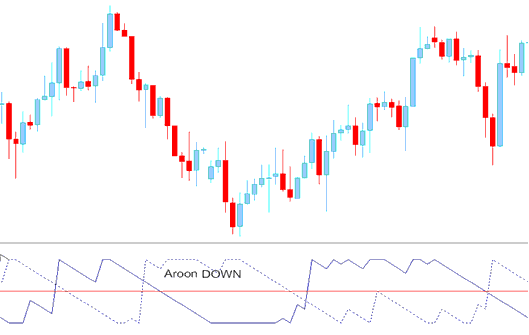
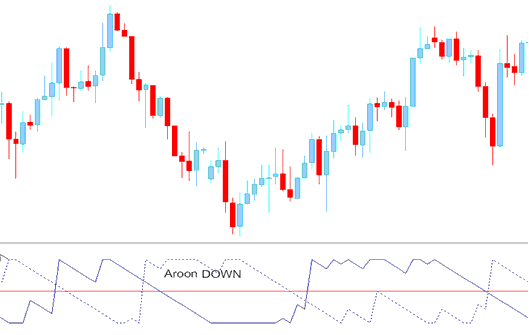
Aroon DOWN
Aroon Down is calculated the same as Aroon UP forex indicator line but this time using the lowest point instead of the highest point on the trading forex price chart.
When a new low is set Aroon DOWN is at 100 and when a new high is set it'll move to zero.
How Do You Use MT5 Aroon Technical Indicator in MT5?
How to Generate Buy and Sell Signals
Aroon MT5 technical indicator uses the 50% level to measure momentum of the forex trend.
Forex Buy Signal and Exit Forex Signal
Aroon UP above 50 is interpreted as a buy signal
Aroon UP moving below 50 level is an exit trading forex signal if you had opened a buy forex trade.
Forex Sell Signal and Exit Forex Signal
Aroon DOWN below 50 is interpreted as a sell signal.
Aroon DOWN moving above 50 level is an exit trading forex signal if you had opened a sell forex trade.
How Do You Use MT5 Aroon Technical Indicator in MT5?
How Do You Use MT5 Aroon Technical Indicator in MT5?
