How to Add MT4 True Strength Index TSI Indicators in MetaTrader 4 Chart
Step 1: Open MT4 Software Navigator Window Panel
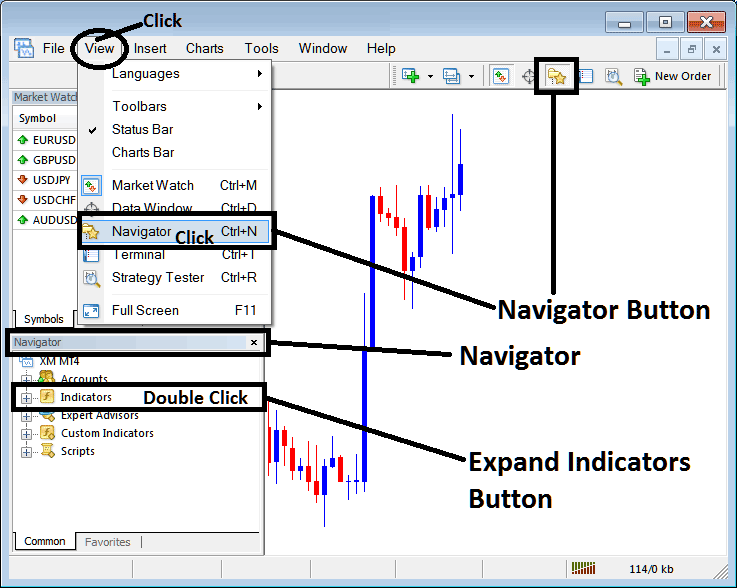
Open MetaTrader 4 Navigator window as shown on example below: Go to "View" menu (click), then choose the "Navigator" window (click), or From Standard Tool Bar click the "Navigator" button or press keyboard MT4 shortcut keys "Ctrl+N"
On MT4 Navigator window, select "Indicators", by Double Clicking
How Do You Use MT4 True Strength Index TSI Indicator in MT4?
How to Add True Strength Index TSI MT4 Indicator
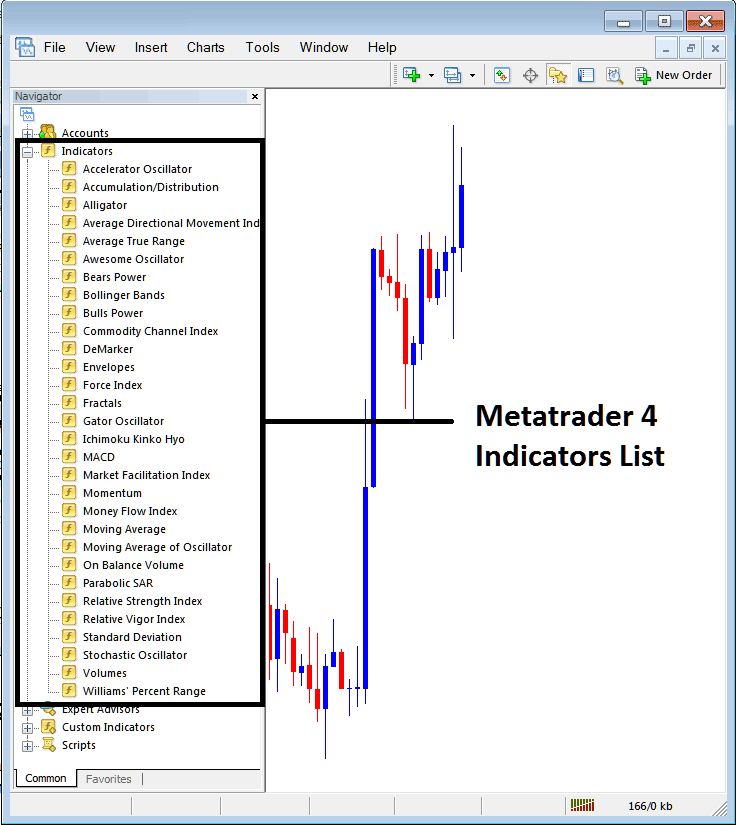
Expand the menu by clicking the expand button marker (+) or double click the "indicators" menu, after this the button will appear as (-) and will now display a list of MT4 indicators as shown on example below - select the True Strength Index TSI indicator from this list of MT4 indicators so that you can add the True Strength Index TSI MT4 indicator in MetaTrader 4 forex chart.
How Do You Use MT4 True Strength Index TSI Indicator in MT4?
How Install and Add Custom True Strength Index TSI Indicator on MT4?
If the MT4 indicator that you want to add on the MT4 charts is a custom MT4 indicator - for example if the True Strength Index TSI indicator that you want to add is a custom MT4 indicator you will need to first add this custom True Strength Index TSI MT4 indicator in MetaTrader 4 platform & then compile custom True Strength Index TSI technical indicator so that the newly added True Strength Index TSI MT4 custom indicator pops up on the list of custom indicators in MetaTrader 4 software.
To learn how to add True Strength Index TSI indicators on MT4 - how do you add True Strength Index TSI indicator window to MT4 platform? - how do you add True Strength Index TSI forex custom indicator on MT4? - How to add a custom True Strength Index TSI custom forex indicator in MetaTrader 4.
How Do You Use True Strength Index TSI MT4 Indicator?
True Strength Index (TSI) Technical Indicator Technical Analysis & TSI Buy & Sell Signals
Developed by William Blau
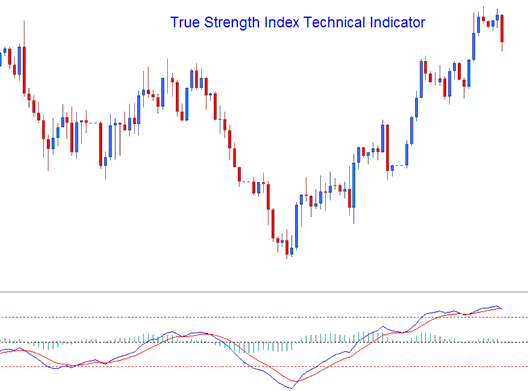
True Strength Index is a momentum indicator. The TSI is plotted by using a momentum calculation that reacts faster and is more responsive to forex price changes, making it a leading indicator that follows forex price action direction closely in the forex market.
The True Strength Index is plotted as a blue line, the indicator also plots a signal line which is plotted as a red line, and these two lines are used to generate crossover signals.
True Strength Index also plots a histogram which shows the difference between the TSI Line and the Signal line. This histogram crosses above or below the center lines, histogram levels above the center line shows a bullish crossover signal, while center line levels below the center line shows a bearish crossover signal.
How to Add MT4 True Strength Index TSI Indicators in MetaTrader 4 Chart
How to Generate Buy and Sell Signals
TTSI indicator uses various forex technical analysis methods to generate forex signals. TSI indicator can be analyzed in the same way as the RSI indicator to determine general forex trend direction. Overbought and oversold levels can also be shown interpreted the TSI indicator. The most common forex technical analysis methods of generating TSI indicator trading signals are:
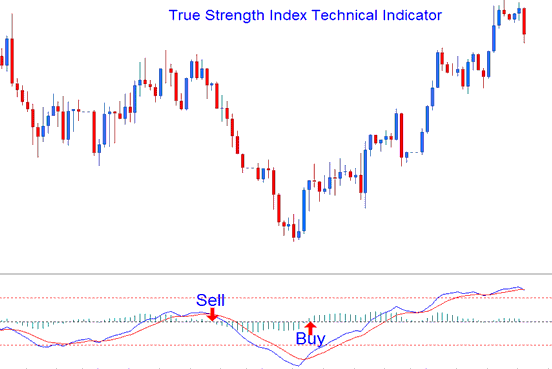
Zero line FX Trading Crossover (Histogram FX crossover not Lines Forex Trading crossover )
- Buy Forex Signal - a buy signal is generated when the TSI indicator histogram crosses above 0 center line mark
- Sell Forex Signal - a sell signal is generated when the TSI indicator histogram crosses below 0 center line mark
Analysis of MT4 Indicator True Strength Index TSI Trading Indicator
Forex Signal Line FX Trading Crossover
- A buy signal is generated when the TSI indicator line crosses above the Signal line
- A sell signal is generated when the TSI indicator line crosses below the Signal line
This forex trading signal is the same as the forex signal described above and the timing corresponds to the time when the TSI indicator histogram crossovers happen.
Divergence Forex Trading
Divergence forex trading is used to look for potential forex trend reversal areas. The forex reversal divergence forex trading setups are:
Classic Forex Divergence Trading
Classic Bullish Divergence: Lower lows in the forex price and higher lows on the TSI indicator
Classic Bearish Divergence: Higher highs on the forex price and lower highs on the TSI indicator
Divergence forex trading signals can also be used in identifying potential forex trend continuation areas in forex price direction. The continuation divergence forex trading setups are:
Hidden FX Divergence Trading
Hidden Bullish Divergence: higher lows on the forex price and lower lows on the TSI indicator
Hidden Bearish Divergence: lower highs on the forex price and higher highs on the TSI indicator
Overbought and Oversold Levels on Indicator
Overbought and oversold levels can be used to identify the overbought and over-sold conditions in forex price movement.
- Overbought Levels - TSI indicator values greater than the +25 level
- Oversold Levels - TSI indicator values less than the -25 level
Forex trades can be generated when the TSI indicator crosses these overbought oversold levels.
Buy forex signal - a buy signal is generated when the TSI indicator crosses above -25 level.
Sell forex signal - a sell signal is generated when the TSI indicator crosses below +25 level.
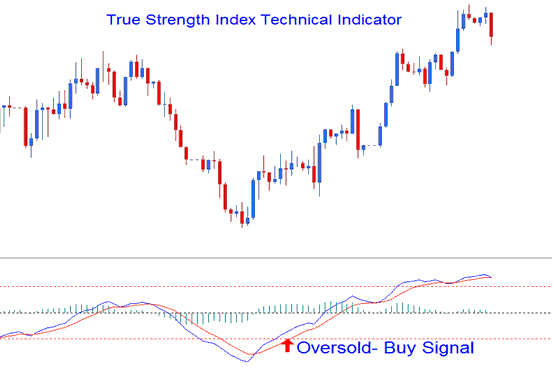
Oversold Levels
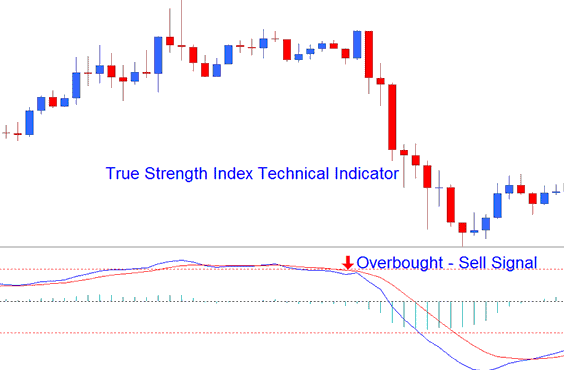
Overbought Levels
The overbought and oversold levels are displayed using horizontal lines drawn at the +25 and -25 forex indicator levels.
How Do You Use MT4 True Strength Index TSI Indicator in MT4?
