Best Momentum Settings for Commodities Day Trading
Adding MT4 Momentum Indicator
Step 1: Open MetaTrader 4 Software Navigator Window Panel
Open MetaTrader 4 Navigator window as illustrated and shown below: Go to "View" menu (click it) & then choose the "Navigator" window (click), or From Standard Tool Bar click on the "Navigator" button key or use short cut keyboard keys "Ctrl+N"
On MT4 Navigator window, select 'Technical Indicators', (Double Click)
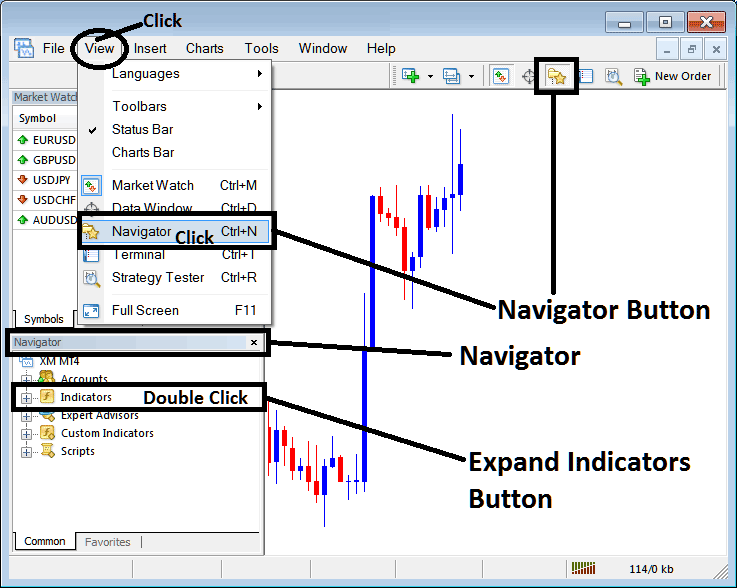
Best Momentum Settings for 4 Hour Commodities Trading Chart - Best Momentum Setting for Commodities Day Trading
Adding Momentum MT4 Indicator
Expand the menu by clicking on the expand button key marker (+) or double click "indicators" menu, after this the button will appear as (-) and will now display a list as shown below - select the Momentum indicator from this list of commodity MT4 indicators so as to add the Momentum indicator on the commodity chart.
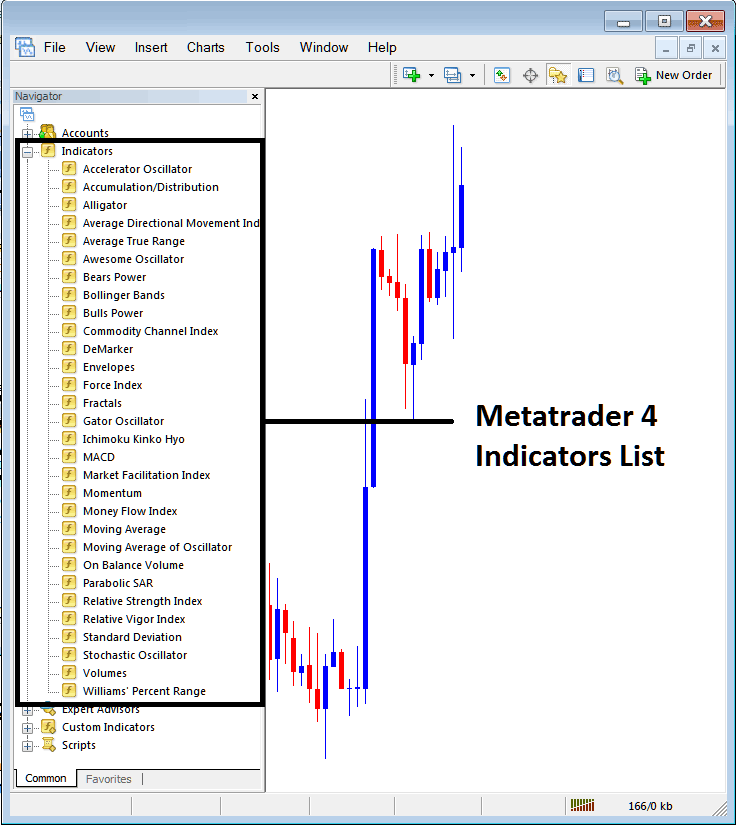
Best Momentum Settings for 4 Hour Commodities Trading Chart - Best Momentum Setting for Commodities Day Trading
How to Setup MetaTrader 4 Momentum Indicator
If the technical indicator you want to add is a custom MT4 Momentum indicator - for example if the Momentum technical indicator you want to add is a custom indicator you will need to first add this commodity custom Momentum indicator in MetaTrader 4 platform & then compile custom Momentum indicator so that the newly added Momentum commodity custom MT4 indicator appears on the listing of custom commodities indicators in MetaTrader 4 software.
To learn how to install Momentum indicator on MT4, how to add Momentum indicator window to MT4 and how to add Momentum commodity custom MT4 indicator on MT4 platform - How to add custom Momentum commodity Indicator in MetaTrader 4.
Momentum Commodity Technical Indicator Described
Momentum Technical Indicator Commodity Trading Technical Analysis & Momentum Oscillator Trading Signals
The momentum commodity technical indicator uses math equations to calculate the line of drawing this technical indicator. Momentum technical indicator measures velocity with which commodity price changes. This is calculated as the difference between the current commodity price candle & the average commodity price of a selected number of previous commodity price bars.
Momentum indicator represents the rate of change of the commodity price over those specified time periods. The faster the commodity prices rise, the bigger the increase in momentum. The faster the commodities prices decline, the bigger the decrease in momentum.
As the commodities price movement begins to slowdown the momentum also will begin to slowdown and return to a median zone.
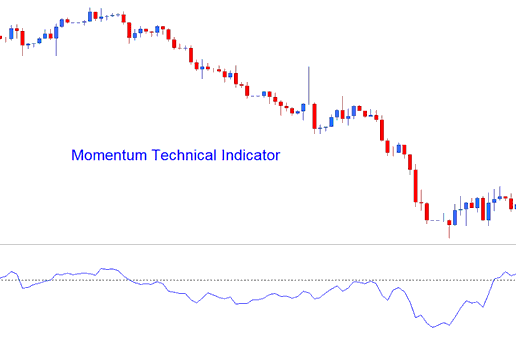
Best Momentum Settings for Commodity Swing Trading - Best Momentum Setting for Scalping Commodities Trading
Momentum Commodity Trading Technical Analysis & How to Generate Momentum Trading Signals
Momentum technical indicator is used to generate technical buy & sell signals. The three most common strategies of generating commodity trading signals are:
Momentum Commodity Technical Indicator Zero Centerline Crossovers Commodity Trading Signals:
- A buy signal is generated when Momentum indicator crosses above zero
- A sell trading signal is generated when Momentum indicator crosses below zero
Momentum Commodities Trading Indicator Overbought and Oversold Levels:
Momentum indicator is used as an overbought oversold technical indicator to identify potential overbought & oversold levels based on previous indicator readings: the previous high or low of the momentum technical indicator is used to determine the overbought & oversold levels.
- Momentum Commodity Trading Indicator Readings above the overbought level mean the commodity price is overbought and a commodity trade price correction is pending
- While Momentum technical indicator readings below the over sold level the commodity price is oversold & a commodity price rally is pending.
Momentum Commodities Trading Trend-line Break outs:
Commodity Trading trend lines can be drawn on the Momentum indicator connecting the peaks & troughs. Momentum indicator begins to turn before commodity price therefore making it a leading commodity indicator.
- Bullish commodity reversal - Momentum technical indicator readings breaking above a downwards technical indicator trendline warns of a possible bullish commodity reversal signal while
- Bearish commodity reversal - Momentum indicator readings breaking below an upwards indicator trend line warns of a possible bearish commodity reversal signal.

Best Momentum Settings for Commodity Swing Trading - Best Momentum Setting for Scalping Commodities Trading




