Best MACD Settings for Commodities Day Trading
Adding MT4 MACD Indicator
Step 1: Open MT4 Software Navigator Window
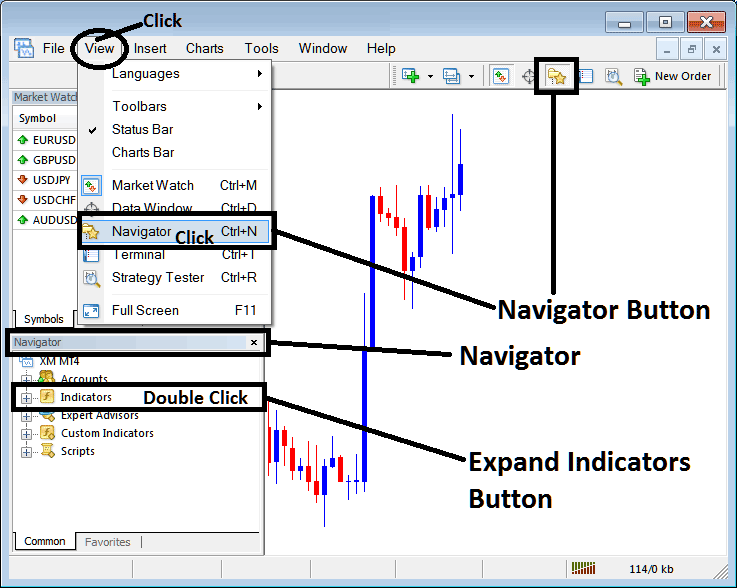
Open MetaTrader 4 Navigator window as illustrated and shown below: Go to 'View' menu (click it) & then choose the 'Navigator' window (click), or From the Standard Tool Bar click on 'Navigator' button key or use keyboard short cut keys 'Ctrl +N'
On MetaTrader 4 Navigator window, select 'Technical Indicators', (Double Click)
Best MACD Settings for 1 H Commodities Chart - Best MACD Setting for 4 Hour Commodities Trading Chart
Adding MACD MT4 Commodity Trading Chart Indicator
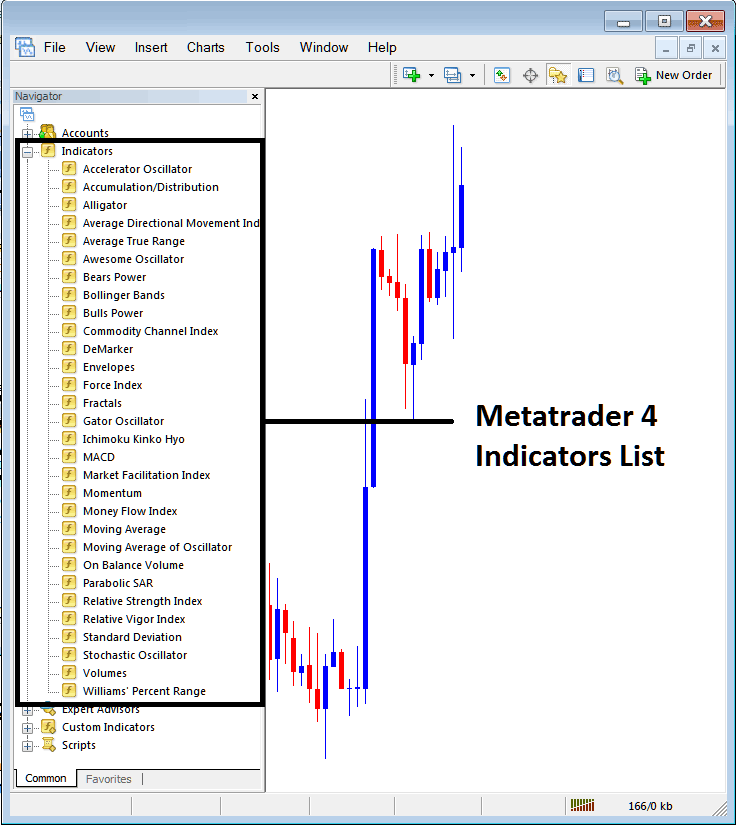
Expand the commodity technical technical indicators popup menu by clicking the expand button marker (+) or double click the 'indicators' menu, after this the button will appear as (-) and will now display a list as shown below - select the MACD indicator from this list of commodity MT4 technical indicators so as to add the MACD indicator on the commodity chart.
Best MACD Settings for 1 H Commodities Chart - Best MACD Setting for 4 Hour Commodities Trading Chart
How to Setup MT4 MACD Indicator
If the technical indicator you want to add is a custom MACD indicator - for example if the MACD indicator you want to add is a MACD custom MetaTrader 4 indicator you'll need to first add this custom MACD indicator in the MetaTrader 4 platform & then compile the custom commodity MACD technical indicator so that the new added MACD custom commodity indicator pops up on the list of custom indicators in MetaTrader 4 software.
To learn how to install MACD indicator in MetaTrader 4, how to add MACD indicator window to MT4 and how to add commodity MACD custom MetaTrader 4 indicator on MT4 platform - How to add a custom MACD commodity Indicator on MT4.
MACD Commodities Technical Indicator Described
MACD Commodities Trading Technical Analysis & MACD Trading Signals
The MACD indicator is one of the simplest, reliable, and most commonly used technical indicators.
MACD is a momentum oscillator & also a commodity price trend following indicator.
Construction of MACD Technical Indicator
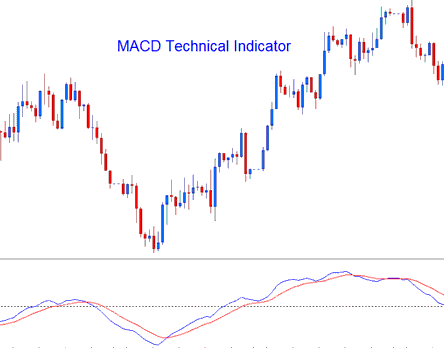
Construction of this MACD technical indicator calculates the difference between two moving averages and then draws that as 'Fast' line: the a second 'Signal' line is then calculated from the resulting 'Fast' line & then plotted on same panel window as 'Fast' line.
- 'Fast' line - Blue Line
- 'Signal' line– Red Line
The 'standard' MACD indicator values for 'Fast' line is a 12-period exponential moving average and a 26-period exponential moving average & a 9-period exponential moving applied to the fast line, this draws the 'Signal' line.
- MACD FastLine - difference between 12 & 26 exponential moving averages
- MACD Signal Line - moving average of this difference of 9 - periods
Best MACD Settings for Commodity Swing Trading - Best MACD Setting for Scalping Commodities Trading
MACD Commodity Trading Technical Analysis & How to Generate Commodities Trading MACD Trading Signals
The MACD indicator is a commonly used as commodity trading price trend following indicator & works most effectively when analyzing commodity trading price trending commodity trading price movements. The three common strategies of using MACD indicator to generate commodity signals are:
Crossovers Commodity Trading Signals:
MACD FastLine, MACD Signal Line Crossover:
- A buy signal gets generated when the MACD Fast line crosses above the MACD Signal line
- A sell signal gets generated when the MACD Fast line crosses below MACD Signal line.
However, in a strong commodity trading price trending market this signal gives a lot of whipsaws, best commodity MACD cross-over to use would thus be the MACD Zero Line Crossover Signal that is less prone to commodity whipsaws.
MACD Zero Line Crossover Signals:
- When the MACD FastLine crosses above MACD zero center-line a buy commodity trade signal is generated.
- when the MACD FastLine crosses below MACD zero center line a sell commodity trade signal is generated.
MACD Divergence Commodities Trading:
Looking for divergences between the MACD indicator & commodity trading price can prove to be very effective in spotting potential commodity trading price trend reversal and/or commodity trading price trend continuation points in commodity trading price movement. There two types of MACD divergences:
- MACD Classic Divergence Trading Signals
- MACD Hidden Divergence Trading Signals
MACD Overbought Commodity Trading Levels & MACD Oversold Commodities Trading Levels:
MACD indicator is also used to identify potential overbought & oversold levels in commodity price action movements.
These overbought and oversold levels are generated if the shorter MACD Lines separate dramatically from the median, this is a signal that commodity price action is over extending and price will soon return back to more realistic regions.
MACD & Moving Average Crossover Commodity Trading System
MACD technical indicator can be combined with other indicators to form a commodities system. A good MACD indicator combination is with the Moving Average cross over commodities trading system. A commodity signal is generated when both commodity technical trading technical indicators give a signal in same direction.

Best MACD Settings for Commodity Swing Trading - Best MACD Setting for Scalping Commodities Trading




