How Do You Use CFD Trading Fib Retracement Levels on MetaTrader 5?
How Do You Trade and Use Fibonacci Retracement Levels on MetaTrader 5?
The procedure on how to use Fib Retracement Levels Indicator in MT5 is described below:
Fibonacci Retracement Levels Technical Indicator on the MT5 platform will automatically draw the cfd price retracement zones on a cfd chart once this Fib retracement levels indicator is placed on the cfd trading chart.
To add this CFDs Fibonacci Retracement Levels indicator on the MT5 platform, you can use the following MT5 platform short cut method:
1. Click Insert 2. Click Fib 3. Click Retracement
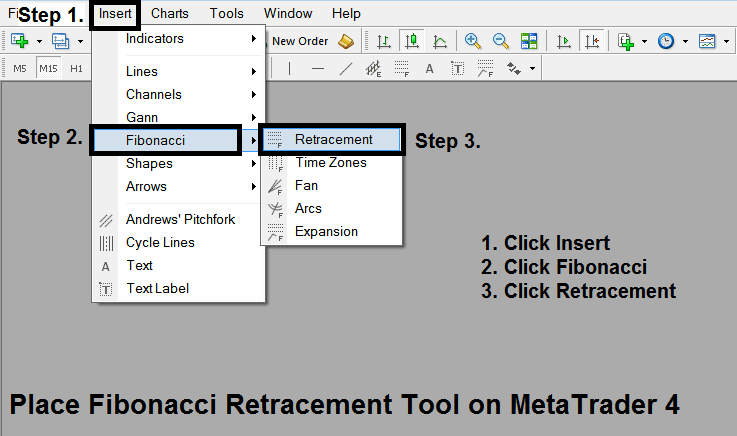
How Do You Use CFD Trading Fib Retracement Levels in MT5
After adding Fib Retracement Levels Technical Indicator on the MT5 platform this cfd technical indicator can then be accessed from 'MetaTrader 5 Line Studies Tool Bar' as shown on the cfd examples explained & illustrated below.
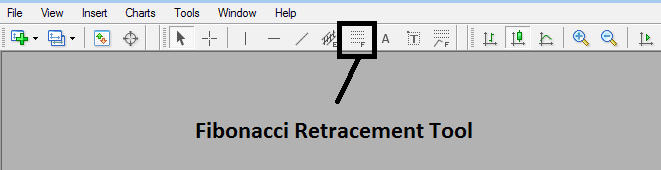
Interpret & Use Fibonacci Retracement Levels on MT5 CFD? - How Do I Trade and Use Fibonacci Retracement Levels on MetaTrader 5?
This CFDs Fibonacci Retracement levels cfd tool is located on MetaTrader 5 cfds platform (Line Studies Tool Bar) - to go to this MT5 line studies tool bar click 'View' button at the tops left corner of MT5 cfds platform next to file, then click 'Toolbars' - Then Check 'Line Studies'.
Interpret & Use Fibonacci Retracement Levels on MT5 CFD?




