Trading CFD Analyze and Use TP CFD Trading Orders & Set SL CFD Orders in MT4
How Do You Trade and Use TP CFD Trading Orders & Set SL CFD Orders in MT4?
How Do You Use Trading CFD Take Profit CFDs Order & Stop Loss CFD Orders? - How Do I Use Trading CFD Take Profit CFDs Orders & Set Stop Loss CFDs Orders in MT4
Trading CFD Set Take Profit CFDs Trading Orders in MT4 Platform
MetaTrader 4 CFDs Charts TP CFD Trading Order
Set Take Profit CFD Orders When Opening CFD Orders on MetaTrader 4
To set Take Profit CFD Order when opening a new cfd order on the MT4 software use the procedure described below:
Set Take Profit CFDs Order When Opening New CFD Order on Tools Menu on MT4 Software
To open a new cfd order to buy or sell a trade use the tools menu found in MetaTrader 4 CFD Trading Platform as shown below.
The New cfd order button key for placing a new cfds trade is displayed below. (MT4 Short-Cut Key-board Keys 'F9')
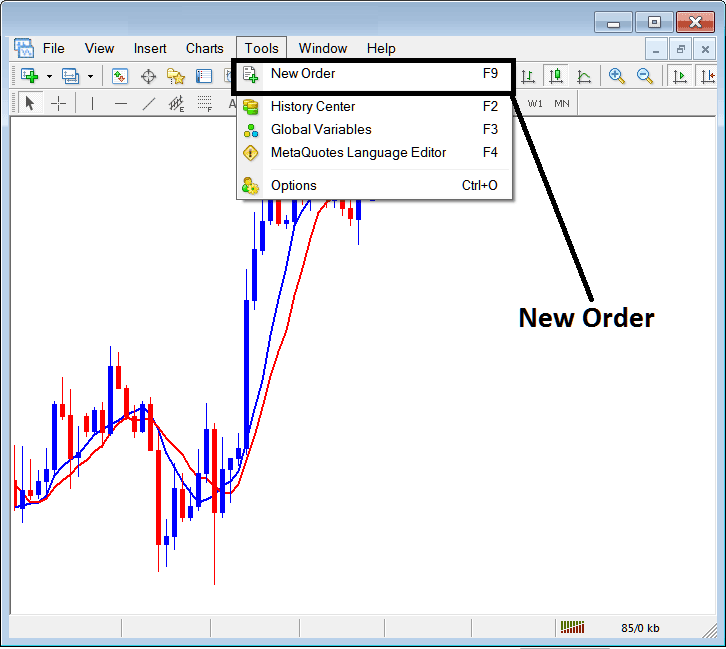
Analyze & Use TP CFD Trading Orders & Set SL CFD Orders in MetaTrader 4?
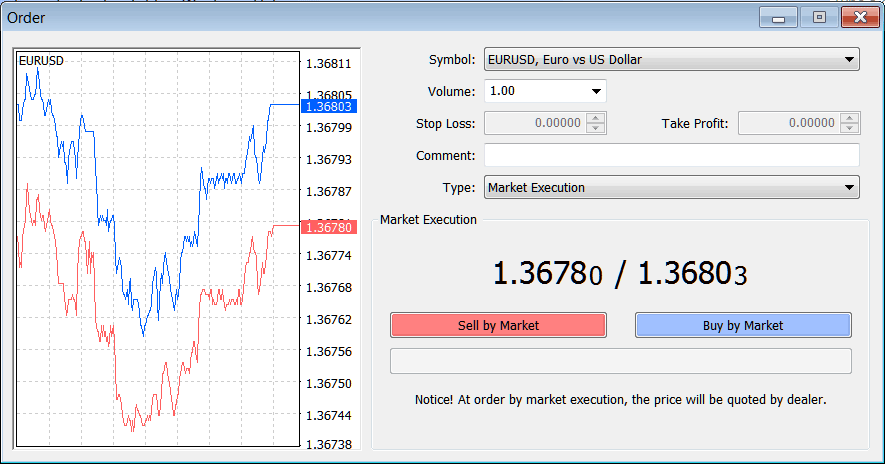
Once you select the new cfd order button key as illustrated above the following cfd trade order pop up panel will appear & as a trader you will use this trade order pop up panel to set the Take Profit CFD Order Level for your new cfd trade.
This pop up includes settings for placing a new cfd trade order as well as settings for setting Take Profit CFD Order Level.
Analyze & Use TP CFD Trading Orders & Set SL CFD Orders in MetaTrader 4?
The Following Take Profit CFD Order Setting are specified for placing a new take profit cfd trading order:
Take Profit CFDs Order - Set Take Profit CFD Order, This option can be set after opening trade, or for pending cfd orders
Open the Buy or Sell CFD Trade by Clicking on the Following Buttons:
- Sell by Market - Open a Sell CFD Trade
- Buy by Market - Open a Buy CFD Trade
To Buy at current cfd price and open new cfd order choose the Buy by Market cfd order button
To Sell at current cfd price and open new cfd order select the Sell by Market cfd order button
After opening the new trades use the Take Profit CFD Order Panel Above to Set the TP order for the New CFD Trading Order.
You can also get this window so as to modify an already open buy or sell cfd trade - To find this order panel for a buy cfd trade, right click on the opened buy or sell cfd trade, then after that you click on the 'Modify Order' after you click the modify order button the above trading order settings button key will popup and you can set Take Profit CFD Order using the step by step procedure described above.
Trading CFDs Set Stop Loss CFD Orders in MT4 Software
MetaTrader 4 CFDs Charts SL CFD Trading Order
Set Stop Loss CFD Orders When Opening CFD Orders on MetaTrader 4
To set Stop Loss CFD Order when opening a new cfd order on the MT4 software use the procedure described below:
Set Stop Loss CFDs Order When Opening New CFDs Order on Tools Menu on MT4 Platform
To open a new cfd order to buy or sell a trade use the tools menu found in MetaTrader 4 CFD Trading Platform as shown below.
The New cfd order button key for placing a new cfds trade is displayed below. (MT4 Short-Cut Key-board Keys 'F9')
How Do I Trade and Use TP CFD Trading Orders & Set SL CFD Orders in MetaTrader 4?
Once you select the new cfd order button key as illustrated above the following cfd trade order pop up panel will appear & as a trader you will use this trade order pop up panel to set the Stop Loss CFD Order Level for your new cfd trade.
This pop up includes settings for placing a new cfd trade order as well as settings for setting Stop Loss CFD Order Level.
How Do I Trade and Use TP CFD Trading Orders & Set SL CFD Orders in MetaTrader 4?
The Following Stop Loss CFD Order Setting are specified for placing a new Stop Loss cfd trading order:
Stop Loss CFDs Order - Set Stop Loss CFD Order, This option can be set after opening trade, or for pending cfd orders
Open the Buy or Sell CFD Trade by Clicking on the Following Buttons:
- Sell by Market - Open a Sell CFD Trade
- Buy by Market - Open a Buy CFD Trade
To Buy at current cfd price and open new cfd order choose the Buy by Market cfd order button
To Sell at current cfd price and open new cfd order select the Sell by Market cfd order button
After opening the new trades use the Stop Loss CFD Order Window Above to Set SL order for the New CFD Trading Order
You can also get this window so as to modify an already open buy or sell cfd trade - To find this order panel for a buy cfd trade, right click on the opened buy or sell cfd trade, then after that you click on 'Modify Order' after you click modify order button the above trading order settings button key will popup & you can set Stop Loss CFD Order using the step by step procedure described above.
How Do You Use CFD Trading TP CFD Trading Orders & Set SL CFD Orders in MetaTrader 4?




