How Do You Add a CFDs Trend-Line on MetaTrader 4 Software?
How Do You Add a CFD Trend Line in MetaTrader 4?
To add MT4 CFD Trend-Lines in MT4 platform - use MT4 cfd trend lines drawing indicator tool.
Select the MetaTrader 4 cfd trend-line plotting tool as shown on the MetaTrader 4 cfd example explained and illustrated below - then select MetaTrader 4 chart point 1 where you want to start drawing the MetaTrader 4 cfd trend line then select MetaTrader 4 chart point 2 where you want to connect the MetaTrader 4 cfd trend line & then extend the trend line into the future cfd prices.
MetaTrader 4 CFD Trading Tools For Drawing MetaTrader 4 CFD Trend Lines
The MetaTrader 4 cfd tools to draw these MetaTrader 4 cfd trend lines are located on the MetaTrader 4 cfd trend line drawing toolbar within the MetaTrader 4 cfds platform - To access this MetaTrader 4 toolbar if it is not activated on your MT4 software, Click in 'View' Next to 'File' menu at tops left corner of the MetaTrader 4 cfds platform and click View, Then Click on Toolbars, Then Check the 'Lines Tool bar' by clicking on it.
Below is an example of the MT4 trend-line plotting tool on MetaTrader 4 charts toolbar. To draw a trend line on MetaTrader 4 cfds chart click on this MetaTrader 4 cfd trend-line plotting tool and select the MetaTrader 4 chart points where you want to draw this MetaTrader 4 cfd trend lines.
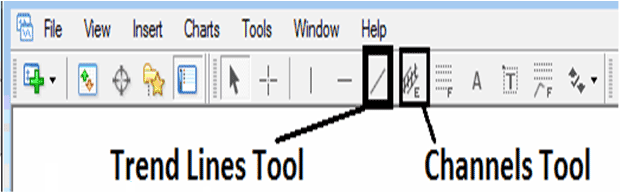
How Do You Add a CFDs Trend-line on MT4 Software?
The direction of the trend-line can either be upwards or downwards depending on the current cfds trend.
How Do You Add a CFD Trend-line on MT4 Platform?
MT4 CFD Platform Guide: Trading CFDs Add an Upward MetaTrader 4 CFD Trend Line on MetaTrader 4
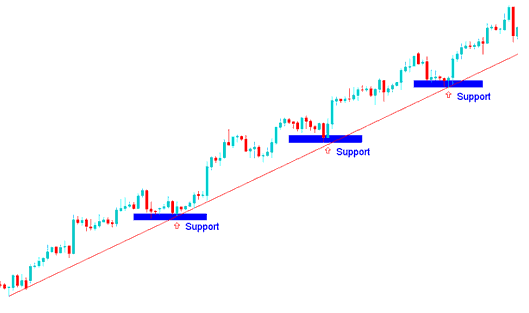
How Do You Add a CFD Trend-line on MT4 Software?
How Do You Add a CFD Trend-line in MT4 Software?
MT4 CFD Platform Guide:How to Add a Downwards MetaTrader 4 CFD Trend Line on MetaTrader 4
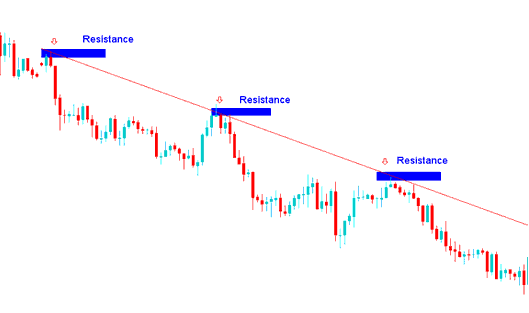
How Do You Add a CFD Trend-Line on MetaTrader 4?
Interpret and Add a CFD Trend-Line on MetaTrader 4?




