How to Draw Oil Trading Fib Extension on MetaTrader 4
How to Add Oil Fib Extension Technical Indicator Tool on MetaTrader 4
Steps: Oil Trading Fibo Extension Levels tool is not shown by default on MT4 software settings, if the Oil Fib Extension Technical Indicator Tool does not appear on your MetaTrader 4 crude oil trading platform, (no need to download this Oil Fib Extension technical indicator) then locate the 'MT4 Line Studies Toolbar' shown below and follow the steps below to add the Oil Trading Fibo Extension Levels indicator Tool in MetaTrader 4:
1. MT4 Line Studies ToolBar - How Do I Draw Oil Fibonacci Extension Levels on MT4 Software?
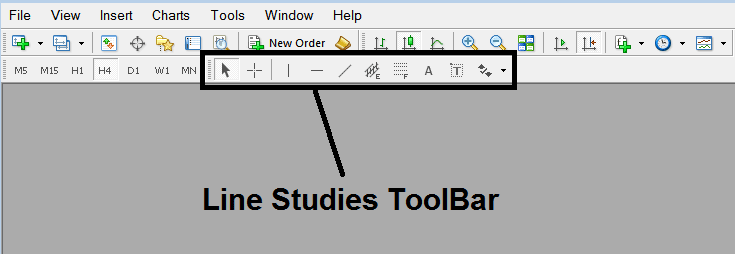
How to Draw Oil Fibonacci Extension in MetaTrader 4 Platform - How to Draw Oil Fib Extension on MetaTrader 4
2. Customize Line Studies Tool Bar - How to Draw Oil Fibonacci Extension Levels in MT4
Right click Customize button key (illustrated below) >>> A dropdown menu appears, Select Customize >>>
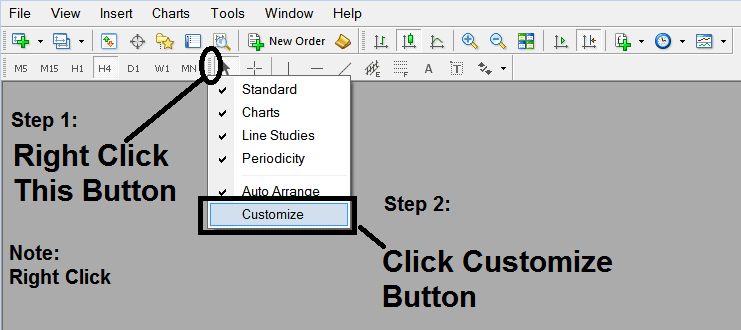
How to Draw Oil Fibo Extension Technical Indicator on MetaTrader 4
3. Place This Oil Fib Extension Tool on MT4 Platform - How to Draw Oil Fib Extension Technical Indicator Tool on MT4 Oil Trading Charts
Select the Oil Fibo Extension Technical Indicator tool from the popup window which will then appear >>> Click Insert button >>> Click Close. (Shown Below)
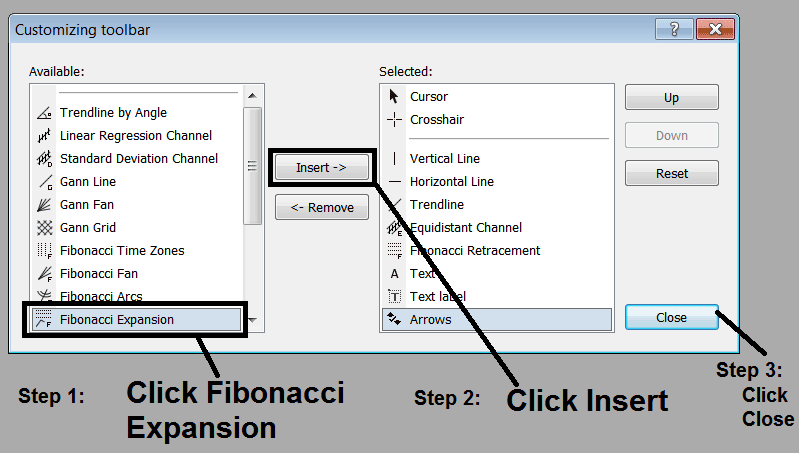
Place Oil Fib Extension Tool on MT4 - How to Draw Oil Fibonacci Extension Tool in MetaTrader 4 Crude Oil Trading Charts
4. Oil Fib Extension Technical Indicator Added - How to Add Oil Fib Extension Tool on MT4
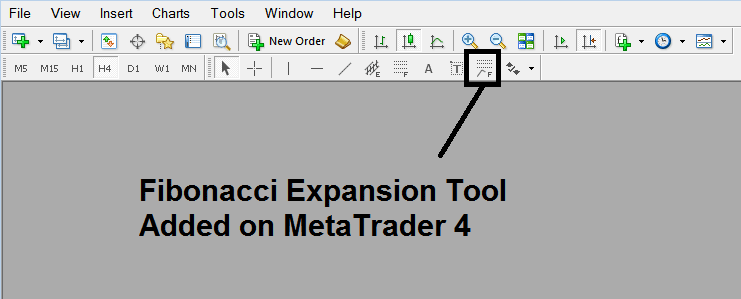
Oil Fib Extension Technical Indicator Added - How to Add Oil Fib Extension Tool on MT4
How Do I Draw Oil Trading Fibonacci Extensions?
A trader can then select the Oil Fib Extension Technical Indicator Tool shown above on the MetaTrader 4 platform and then use this Oil Trading Fib Extension tool to place this indicator on the oil chart & use this Oil Fib Extension tool to determine the Oil Fibonacci Extension Levels on the oil charts.




