Oil Trading Fibonacci Retracement Settings
To get Oil Trading Fibonacci Retracement Technical Indicator settings on the MT4 platform, you can use the following crude oil step by step guide:
1. Click "Insert"2. Click "Fibo"3. Click "Retracement"
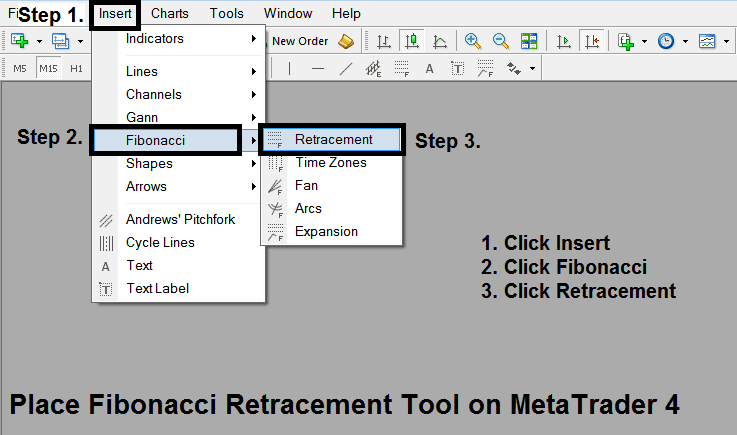
Oil Fibonacci Retracement Trading Indicator
After adding Oil Trading Fibonacci Retracement Technical Indicator tool on the MT4 platform the indicator is shown on the crude oil trading example explained below - this Fibonacci retracement technical indicator can then be accessed from "MT4 Line Studies Tool Bar" as shown on the crude oil trading example explained below. Oil traders can then place this Oil Trading Fibo Retracement Technical Indicator on the oil chart and change the Oil Trading Fibonacci Retracement Technical Indicator Settings by Right Clicking on this indicator on the MT4 Platform and then choose indicator properties & then change the Fib Indicator settings from the properties popup panel that appears.
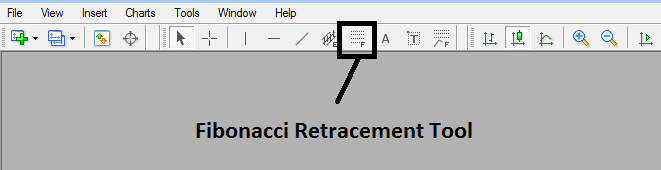
How to Draw Fib Crude Oil Indicator Tool on MetaTrader 4 Oil Trading Charts
This Oil Trading Fib Retracement technical indicator is located on MT4 (Line Studies Tool-bar), to go to this line studies tool-bar click "View" button at the top left corner of MT4 crude oil platform next to file, then click "Tool Bars", Then Check "Line Studies".




