How Do You Trade Kase Peak Oscillator and Kase DevStop 2 Indicator Buy Signal and Sell Signal?
Kase Peak Oscillator and Kase DevStop 2 Forex Indicator Buy Trading Signal
How Do You Trade Forex Buy Signal Using Kase Peak Oscillator and Kase DevStop 2 Indicator?
Steps on how to trade buy signals using Kase Peak Oscillator and Kase DevStop 2 forex indicator:
This Kase Peak Oscillator and Kase DevStop 2 forex indicator buy signal tutorial gives an explanation of how to trade buy signals using the Kase Peak Oscillator and Kase DevStop 2 forex indicator as shown below:
How Do You Trade Forex Buy Signals Using Kase Peak Oscillator and Kase DevStop 2 Indicator
Kase Peak Oscillator and Kase DevStop 2 Forex Indicator Sell Trading Signal
How Do You Trade Forex Sell Signal Using Kase Peak Oscillator and Kase DevStop 2 Indicator?
Steps on how to trade sell signals using Kase Peak Oscillator and Kase DevStop 2 forex indicator:
This Kase Peak Oscillator and Kase DevStop 2 forex indicator sell signal tutorial gives an explanation of how to trade sell signals using the Kase Peak Oscillator and Kase DevStop 2 forex indicator as shown below:
How Do You Trade Forex Sell Signals Using Kase Peak Oscillator and Kase DevStop 2 Indicator
Kase Peak Oscillator Indicator
Forex How Do You Trade Kase Peak Oscillator?
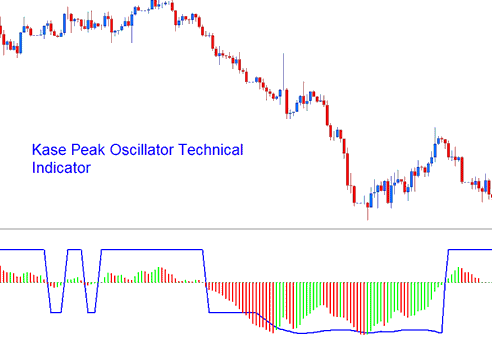
Kase Peak Oscillator indicator is used in same way as other traditional oscillators, but oscillator is derived from a statistical evaluation of the Forex trend: this statistical evaluation evaluates over 50 different trend lengths. Oscillator is capable of automatically adapting itself to the cycle length and volatility changes of the trend.
Kase Peak Oscillator?
Histogram values below the center-line signify bearish trends while values above the center-line signify bullish values. Crossover signals are used as both entry & exit points.
Kase DevStop II Indicator
Forex How Do You Trade Kase DevStop II?
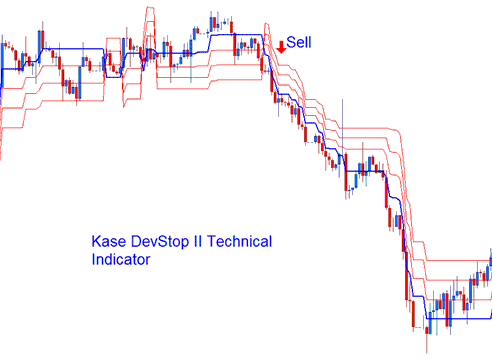
This Indicator is used to determine the realistic exit points for trades based on volatility, variance of the volatility & the volatility skew. This indicator plots 4 lines. The 4 lines are described as a Warning Line & Three Standard Deviations Lines of 1, 2 & 3. These lines allow Forex traders to take profit or cut trading losses at the levels where the probability of a trade remaining profitable is very low, at the same time without taking more of a loss or cutting profit any time sooner than it is necessary.
Kase DevStop 2?
The three red lines are used by traders to set exit levels or stop loss levels. The DevStop II is a trend following indicator.




