How Do I Register for Forex Demo Practice Account?
How to open Forex demo account MT4 - procedure of how to register for a demo account explained:
How to Register for a Forex Demo Practice Account - Forex Demo Account MetaTrader 4
To Register for a Demo Account open the MT4 platform.
On the tops left corner of MetaTrader 4 software: click File then click 'Open an Account' button key as shown below.
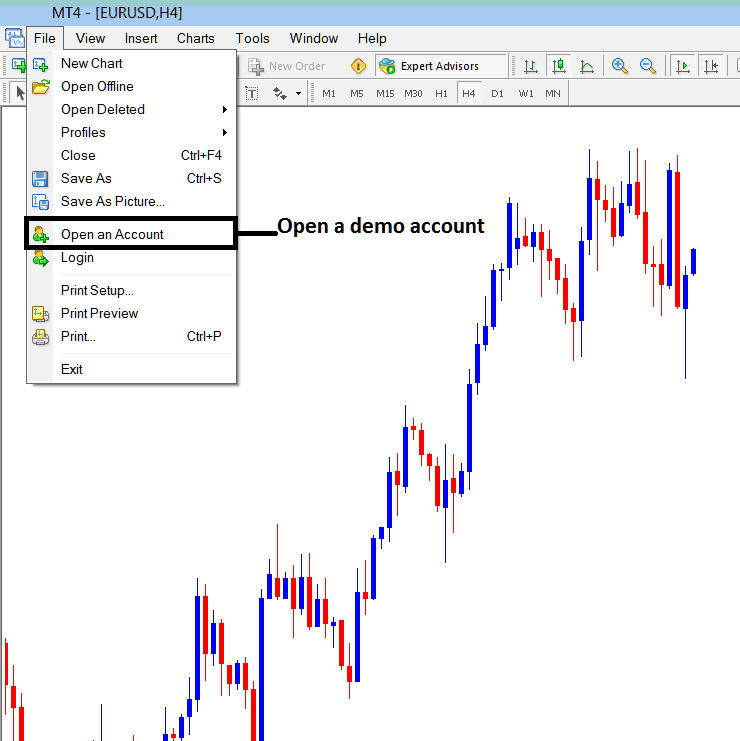
How to Register for a Forex Demo Practice Account - Forex Demo Account MetaTrader 4
Once you click open demo account link you'll be taken to your forex trading MetaTrader broker web site where you can register for practice account details of a Forex practice account - forex demo account MT4 practice trading account.
Next step is to fill the following forex MT4 demo account registration forms displayed below, the required data is:
- Your first name
- Last name
- Country
- City or town
- Phone number
- E-mail address.
After filling these forex practice sign up account details on the form below, click the open demo account button.
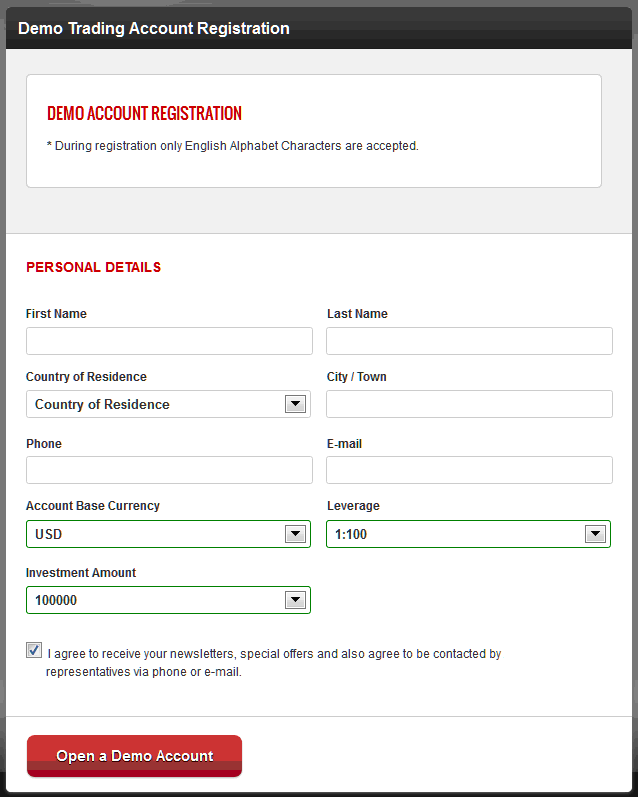
MetaTrader 4 Forex Demo Account Registration - How Do I Register for Forex Demo Practice Account?




