Entry Stop Orders Forex Orders - How to Place a Pending Order in MT4
Buy Stop Orders & Sell Stop Orders are entry stop pending orders that are provided for on the forex trading platform. Traders can then use the forex platform to set these stop orders on the forex charts. This tutorial will explain what are entry stop pending orders - buy stop order and sell stop order. This tutorial will also explain how to use the forex trading platform software to set these pending stop orders when trading with forex trading charts.
Entry Stop Pending Orders are orders to buy above the market or to sell below the market.
- Buy Stop Forex OrderAn order to buy at a level above the market price.
- Sell Stop FX OrderAn order to sell at a level below market price.
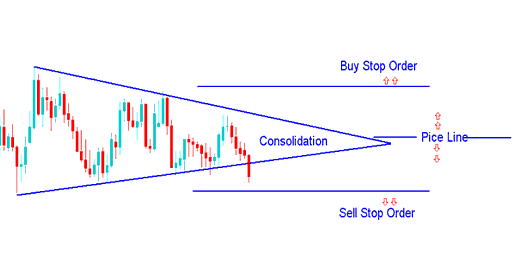
Buy Entry & Sell Entry Orders
These orders are also known as pending orders. Entry stop pending orders are used by traders wanting to trade a set up like the consolidation chart pattern but they don't want to wait & watch the forex prices all day long until there is a forex price breakout. Therefore, forex traders will set these pending orders above & below forex price & a price breakout in any of these direction will execute one of these pending orders & a buy trade or a sell trade will automatically be opened.
Buy Stop Forex Trading Order
In the forex trading examples below a buy stop order was placed to buy at a level above the current forex market price.
The forex price then went up to hit the buy stop order, and afterward forex price continued to move upwards.
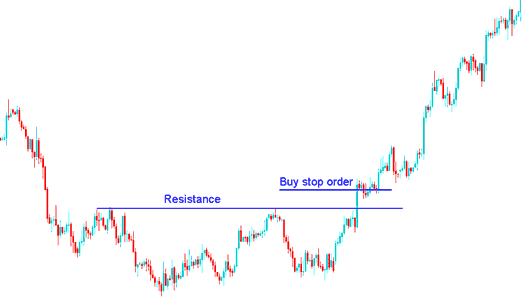
Placing Buy Stop Order above Resistance Level - How to Place a Pending Order Buy Stop Order in MT4
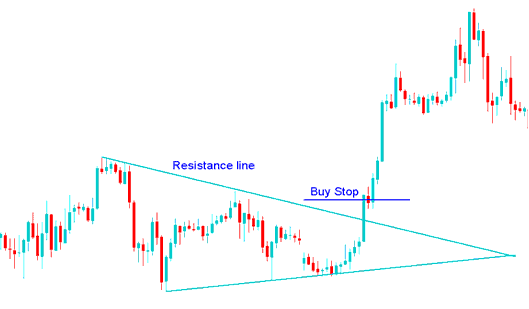
Placing Buy Stop Order in a Forex Breakout - How to Place a Pending Order Buy Stop Order in MT4
A Buy forex trade was generated from the above order when the price broke a resistance line in the first example and when there was an upward forex price break out after a market consolidation pattern.
Sell Stop Forex Order
In the forex trading example below a sell stop order was placed to sell at a level below the current forex market price.
The forex price then went down to hit the sell stop order, & afterward the downwards forex price move continued
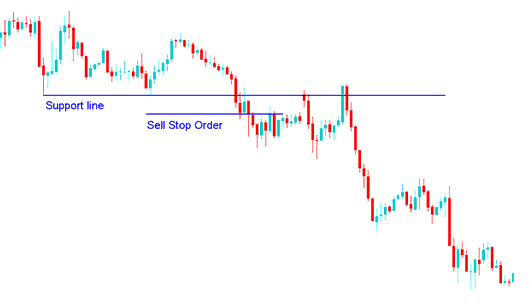
Setting a Sell Stop Order Below a Support Level - How to Place a Pending Order Sell Stop Order in MT4
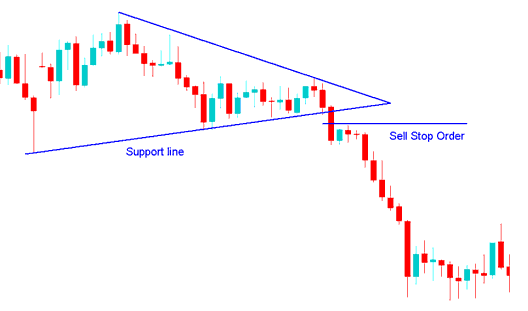
Pending Sell Order Set in a Price Breakout - How to Place a Pending Order Sell Stop Order in MT4
A Sell forex trade was generated from the above sell stop order after support line is broken after a forex consolidation chart pattern.
How to Differentiate Between Pending Stop FX Trading Orders & Pending Limit Forex Trading Orders
It is easier to first of all remember one concept. The easier concept is that of Stop Orders are set above and below the forex price.
In the mean time Download MT4 platform & practice setting these orders on a Practice Demo Account.
Setting Buy and Sell Stop Orders on MetaTrader 4 - How to Place a Pending Order in MT4
Open a Trading FX Chart, Right-Click on forex Trading Chart, Choose New Order, then Follow the steps below
Step1: Select Pending order as illustrated below
Step2: Select Pending order Menu as Show below
Step3: Select Buy Stop or Sell Stop
Step4: Click "Place" Order
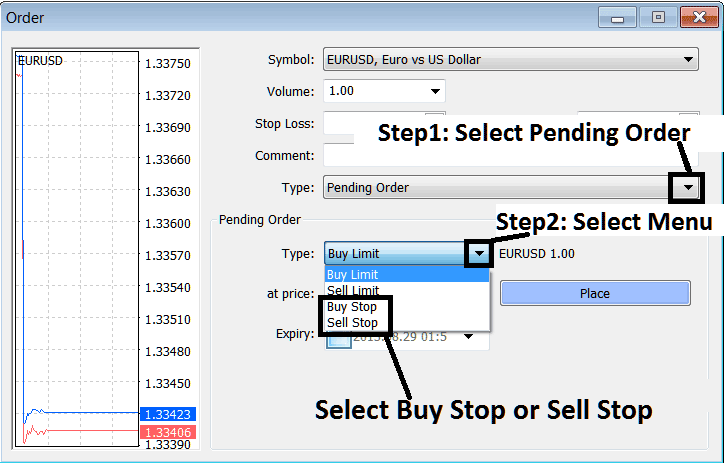
Steps to Setting Entry Stop Pending Orders on MetaTrader 4 - How to Place a Pending Order on MetaTrader 4 Explained




