How to Trade Support & Resistance Zones using CFD Trading Pivot Points
How to Trade Support & Resistance using CFD Trading Pivot Points Guide
Traders wanting to trade using cfd support & resistance levels can use CFD Trading Pivot Points indicator which is used by traders to calculate Resistance Levels as well as Support Levels for the cfd price.
CFD Trading Pivot points will calculate 3 Support Levels below the cfd price and 3 Resistance Levels above the cfd price.
Traders can use CFD Trading Pivot Points indicator to find where these Support and Resistance Levels are - and then use these Support and Resistance Levels to open their cfds trades or close their cfds trades depending on the signals generated by their cfd system.
The pivot points cfd indicator is made up of a central pivot point central area that is surrounded by 3 resistance zones above and 3 support zones below
Resistance Level 3
Resistance Level 2
Resistance Level 1
Pivot Point
Support Level 1
Support Level 2
Support Level 3
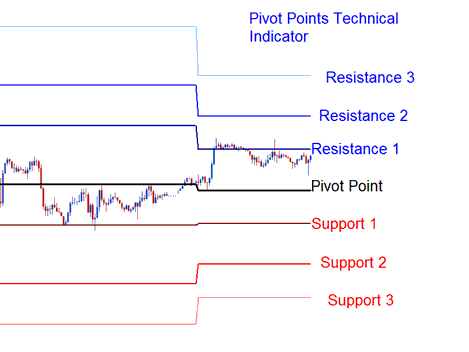
How to Trade Support and Resistance using CFD Trading Pivot Points Tutorial
Support Levels using CFD Trading Pivot Points
Support Levels in CFD Trading Pivot Points are used to generate buy signals
Buy cfd signal - when price moves downward towards one of the pivot point support level, then touches the pivot support region or moves slightly beyond the pivot support region then it quickly reverses and starts moving upwards.
Resistance Levels using CFDs Trading Pivot Points
Resistance Levels in CFD Pivot Points are used to generate sell signals
Sell cfd signal - when price moves up toward one of the pivot point indicator resistance level, then touches the pivot resistance region or moves slightly beyond the pivot resistance region then it quickly reverses and starts moving downwards.
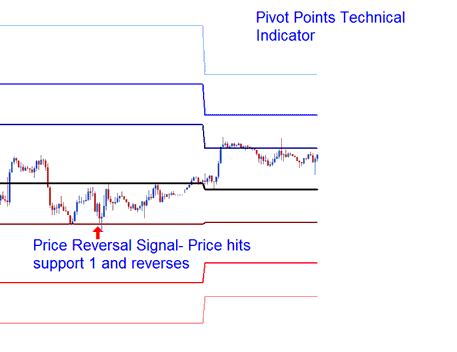
Resistance Levels in CFD Trading Pivot Points are used to generate sell signals
How to Trade Support & Resistance Zones using CFD Trading Pivot Points?




