Trading CFD Set Buy Limit CFDs Order & Sell Limit CFDs Order on MT4
How Do You Set Buy Limit CFDs Order & Sell Limit CFDs Order on MT4 Platform?
CFDs Trading Pending Orders on MT4
To set up these cfds trading pending cfd orders in MetaTrader 4 platform, Right Click on CFD Trading chart>>> Select 'Trading'>>> Then Select 'New'>>> Then on the popup window that appears (shown and illustrated below), under label 'Type' select option of 'pending' instead of 'market execution'>>> Under the pending cfd order options select the pending cfds order type: For This trade choose and select either 'Buy Limit CFD Order" or "Sell Limit CFDs Order" depending on whether you want to place a pending buy or sell cfd trading order.
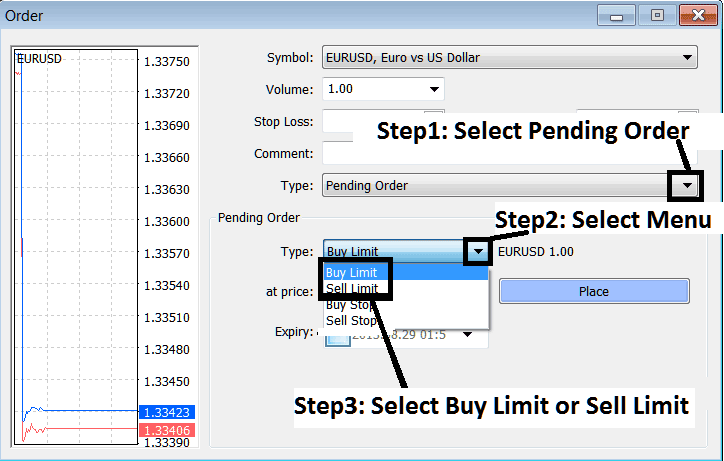
CFDs Trading Pending Orders - Setting Buy and Sell Limit CFDs Orders in MT4
Limit order definition - Pending limit cfd order is an order to buy or sell cfd at a certain cfd price which is a retracement level where cfd price is predicted to pull-back to before resuming the original CFD trend. Traders use them to buy or sell at better market price. These types of pending orders are provided for in most online cfd platforms, for our example we will use the MT4 platform.
An entry pending cfd order of this type can be used to buy below the cfd market level (up cfds trend market retracement) or sell above the cfd market level (downwards cfd trend CFD Trading market retracement).
Buy limit Order - When buying, your entry buy limit is executed when the cfd market falls to your set cfd price. ( retraces downward )
Sell limit Order - When selling, your entry sell limit is executed when the cfd market rises to your set cfd price. ( retraces upwards )
Pending cfd orders are placed by traders when they expect cfd price to bounce back after reaching this zone.
- Pending Buy Limit CFD Orderbuy at a level below the current market price.
- Pending Sell Limit CFD Ordersell at a level above the current market price.
Buy Limit CFD Order Example
In the cfd example explained below, the buy limit order was placed to buy at a cfd price below the current market cfd price. Chart Point B is point at which it was set.
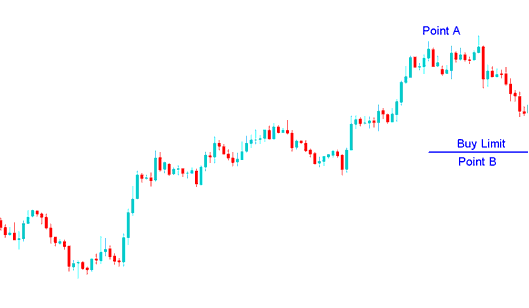
Set Buy Limit CFDs Order & Sell Limit CFDs Order in MetaTrader 4 Platform?
The cfd trend then retraced and went down to hit the buy entry limit, and afterwards cfd price continued to move upwards in the direction of the original CFD Trading upwards trend. When the limit buy cfd order was hit it changed to a buy.
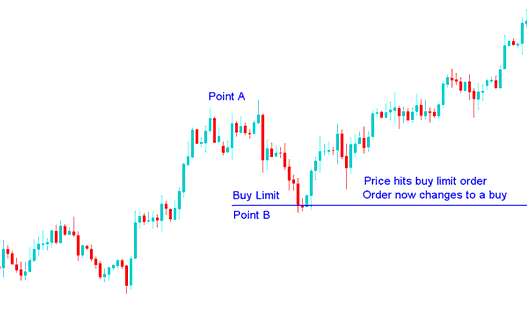
CFD Trading Set Buy Limit CFDs Order & Sell Limit CFDs Order on MT4 Platform - Set Buy Limit CFDs Order & Sell Limit CFDs Order in MetaTrader 4 Platform?
Sell Limit CFDs Order Example
In the sell limit pending order examples explained below a the sell entry limit was placed to sell at a cfd price above the current market cfd price. This is the level for the cfd price retracement.
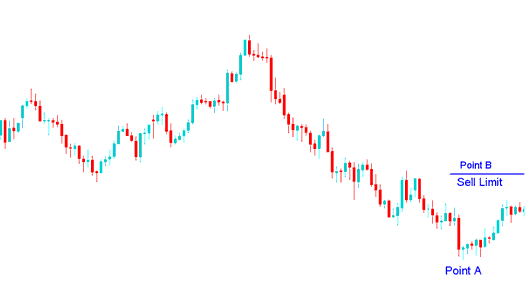
How Do You Set Buy Limit CFDs Order & Sell Limit CFDs Order in MetaTrader 4 Platform?
The cfd trend then rallied, went up to hit the sell entry limit, and afterwards cfd price continued to move downward in the direction of the original CFD Trading downwards trend.
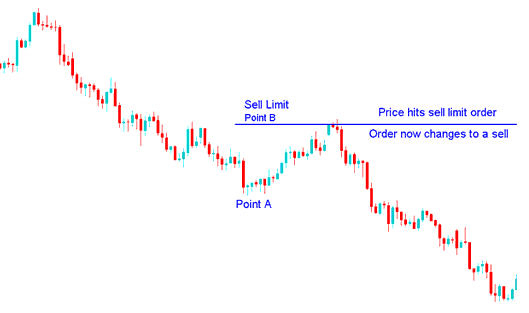
How Do You Set Buy Limit CFDs Order & Sell Limit CFDs Order in MetaTrader 4 Platform?
When cfd quote hit the set level the order changed to a sell, this is therefore a nice technique to buy or sell at a better cfd price after a retracement.
Set Buy Limit CFDs Order & Sell Limit CFDs Order in MT4 (MT4)




