How to Read a CFD Trailing Stop Loss CFD Order
CFD Trade a CFD Trailing Stop Loss CFDs Order
A trailing stop-loss is a stoploss levels that keeps adjusting itself automatically by a set number of pips once the cfd market moves in the direction of the trader's open trade position by a number of pips.
For examples the trailing stop can be set at 30 pips & set to adjust itself to 30 pips automatically once the cfd price moves up by 5 or 10 pips. This means that this trailing stop-loss order will keep trailing the cfd price as long as the price keeps moving in the direction of the trader's open position.
This trailing stoploss will close out the order once the cfd market starts to retrace & it retraces to the level of the most recent set trailing stop loss level.
A good indicator used to set trailing stop-loss levels is Parabolic SAR technical indicator:
Parabolic SAR Technical Indicator
Parabolic SAR is used by traders to set a trailing cfd price stop loss levels
The Parabolic SAR provides good exit points that keep trailing the cfd price of cfd.
In an upward cfd trend, you should close long trades when the price falls below the parabolic SAR technical indicator
In a downward cfd trend, you should close short trades when the price rises above the parabolic SAR indicator.
If you are trading long then the cfd price is above the parabolic SAR, the parabolic SAR will move up everyday, regardless of the direction in which the cfd price is moving. The amount the parabolic SAR moves up depends on the amount that cfd prices moves. Once cfd price moves below the parabolic SAR as illustrated & shown on the cfd example explained and illustrated below, then traders should close their open buy cfds trades at the trailing stop level provided by Parabolic SAR technical indicator.
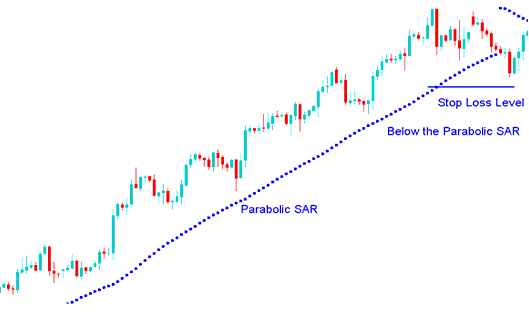
Parabolic SAR - CFDs Technical Indicator for Setting Trailing Stop Loss CFD Order Levels
Interpret CFD Trailing Stop Loss CFDs Order - How to Trade a CFD Trailing Stop Loss CFD Order




