Trading CFD Analyze and Add a MT5 CFD EA on MetaTrader 5
How Do You Add a MT5 CFD EA on MetaTrader 5?
Trading CFD Setup an Expert Advisor in MT5 Software?
The procedure for installing EA on the MT5 software is explained below:
MT5 MetaEditor Language: How Do You Add CFD Expert Advisors?
The Meta-Editor language Editor is a coding environment on the MT5 cfds platform that cfds traders can use to add new EAs, Custom Technical Indicators, Scripts, Libraries & Include Files which are used in programming automated EA robot programs.
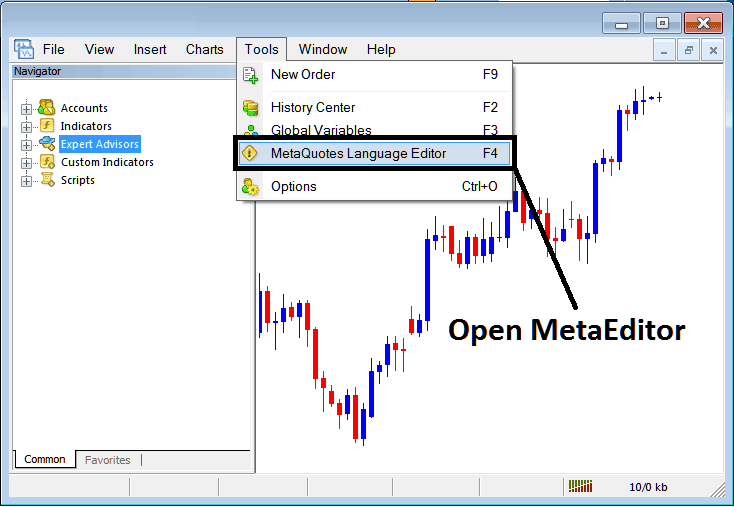
The MT5 MetaEditor is shown and illustrated below and traders can access it from the Tools menu on MetaTrader 5 automated cfd platform. This Meta Editor is popular with cfd traders who use automated Expert Advisors & CFD Bots to trade cfd instruments. If you are a CFD Trader Looking for Automated EA CFD Robots, then you can find them on the MetaTrader 5 CFDs Expert Advisors Library.
CFD Automated Bot Download
MetaTrader 5 Automated CFD Trading Setup

How to Add MT5 CFD Expert Advisor on MetaTrader 5?
After Adding a new MT5 CFD Expert Advisor, a trader will be required to compile this newly added item so that it can now be recognized by the MT5 cfds trading platform and for this new MQL5 Expert Advisor Robot so that it can begin to appear on the list of available Expert Advisors in MT5 Platform.
Bots EA CFDs Trading Bots
Once you have opened the Meta Editor Workspace as displayed above, MT5 ShortCut Key-board Keys - Press F4 Key, then follow the steps below to add your new MetaTrader 5 Automated Trading EA.
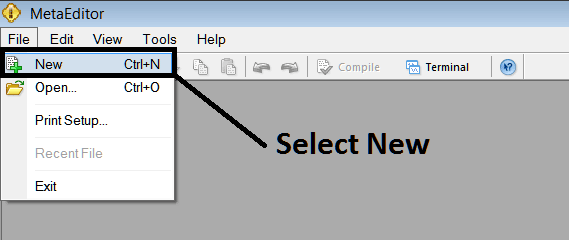
Step1: Go To File Menu, Select 'New'
How to Add MT5 CFD Expert Advisor on MetaTrader 5?
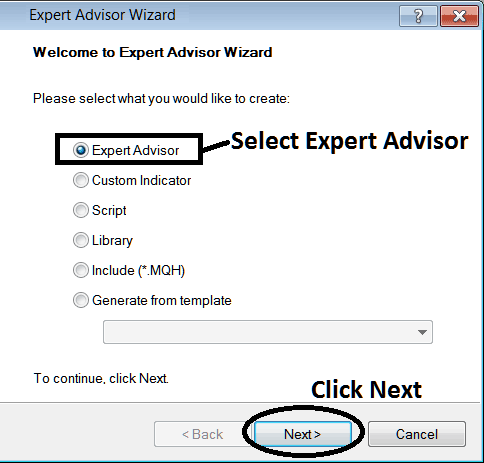
Step2: On Pop-up window that appears select 'Expert Advisor'and click next as illustrated below
How to Add MT5 CFD Expert Advisor on MetaTrader 5?
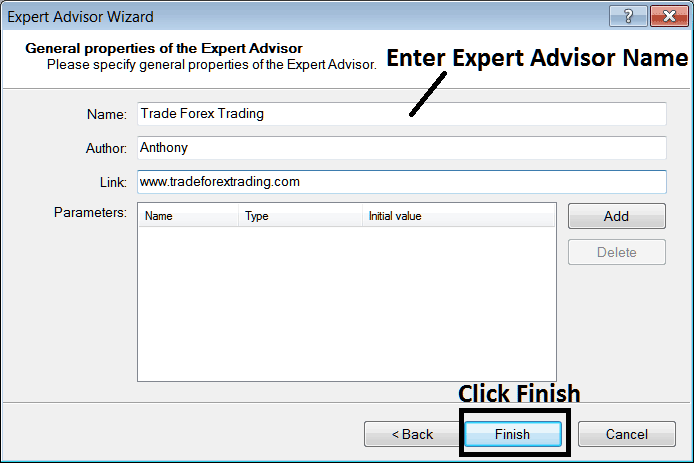
Step3: Enter Name of MQL5 EA as Shown Below and Click Finish
Interpret and Add a MT5 CFD Expert Advisor on MetaTrader 5?
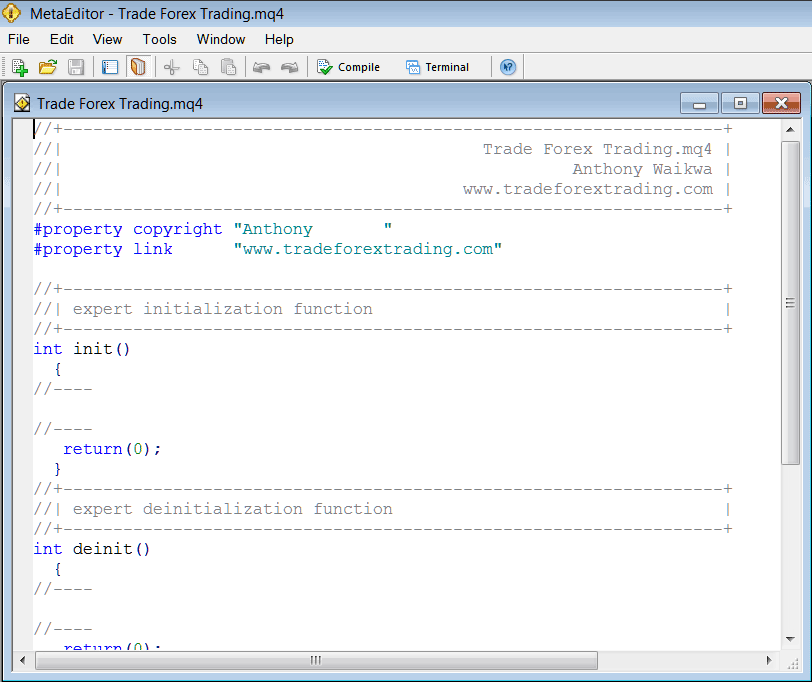
The Following Expert Advisor Program will Pop-up
Interpret and Add a MT5 CFD Expert Advisor on MetaTrader 5?
To Program this Automated CFDs Expert Advisor robot, it requires that you are a programmer who knows the C plus plus Object Oriented Coding Language, That's the Coding Language that forms the MQL5 CFD EA Programming Language that is used to Program the MT5 cfds software as well as the MQL5 Expert Advisor CFD Robots that trade on this MQL5 cfds trading platform. Or you can find the community of MQL5 Programmers & they can program the Automated Expert Advisor trading robot for you. Or you can find a MetaTrader 5 EA coding tutorial for coding and Learn, or you can navigate to MQL5.com Library of Automated CFD Robots and buy an already programmed Automated EA if you want to begin automated trading.
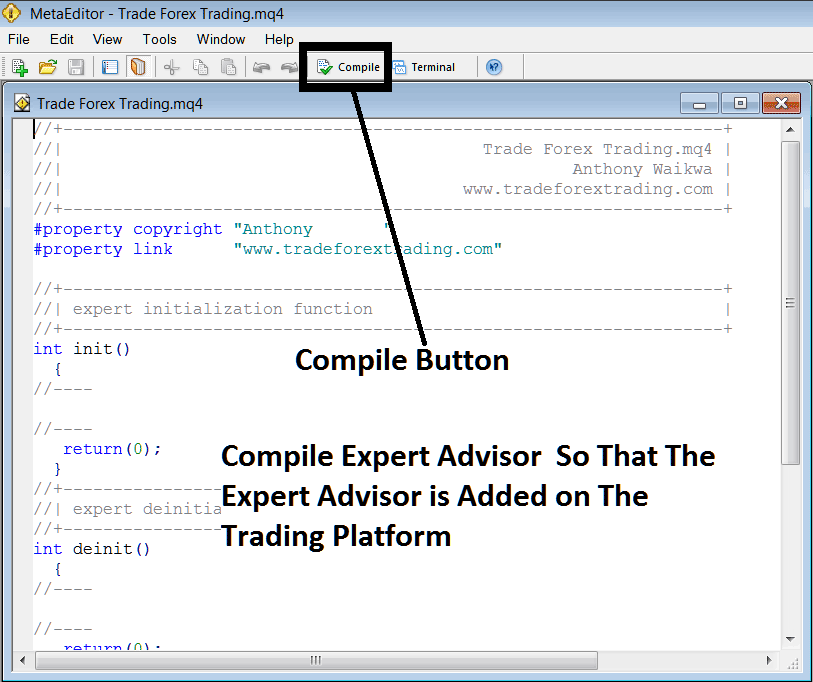
Step4: Compile the Automated CFDs EA Program
Don't forget to compile the Expert-Advisor Robot on your MT5 cfd trading Platform, for the Automated EA to be recognized by the MT5 cfds trading software: one must compile the program, then close MT5 cfds platform & restart it, just like when you restart your desktop computer you'll restart you MT5 CFD Trading platform and your new Automated Expert Advisor will then be Listed on the MetaTrader 5 Expert Advisor List within the MT5 cfds platform Navigator Panel.
CFD Add a MT5 CFD Expert Advisor on MetaTrader 5?
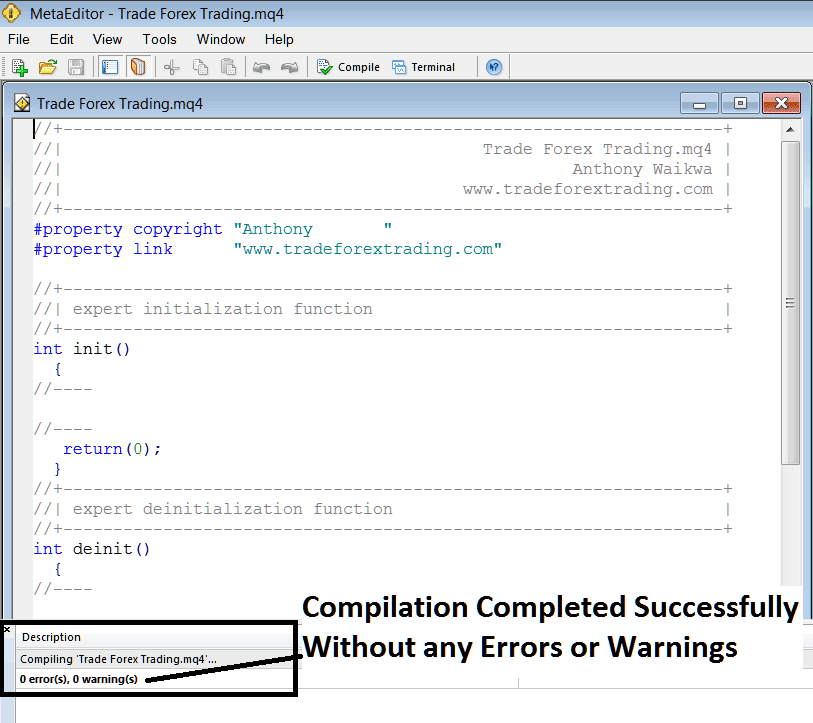
If your Automated CFD EA has no Coding Errors, it will be Compiled successfully without any error as illustrated below.
How Do You Add a MT5 CFD Expert Advisor on MetaTrader 5?
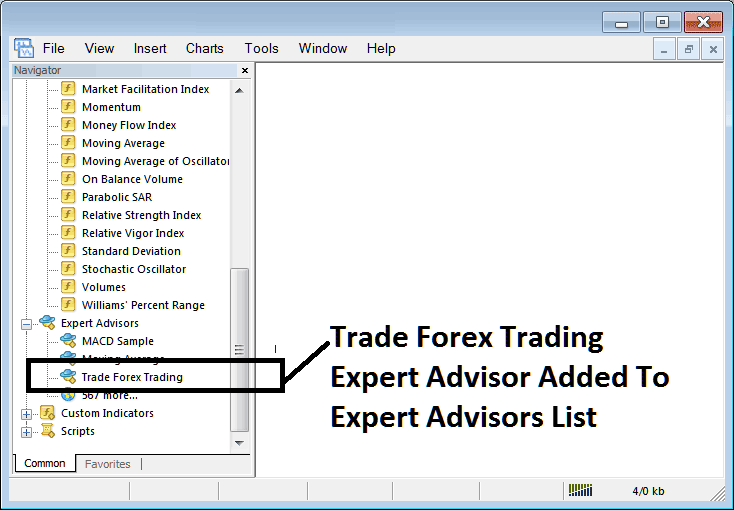
Step5: Rebegin MT5 & the new EA robot should now be listed on the available List in MT5 Navigation Menu as illustrated below, ready for beginning trading with.
How Do You Add a MT5 CFD Expert Advisor on MetaTrader 5?
Interpret and Add a MT5 CFD EA in MetaTrader 5




