Trading CFDs Login to MQL5 Account
Steps on how to login to MQL5 Account from MetaTrader 5 CFD Platform - MQL5 Log-in.
- Open MT5 CFD Platform.
- Select the "Tools Menu".
- Click "Options Menu".
- Select The "MQL5 Community Tab" Shown below.
- Type your MQL5 Login Account Name & Password.
Setting Up An Account to Use for Automated Trade CFDs Trading on MetaTrader 5
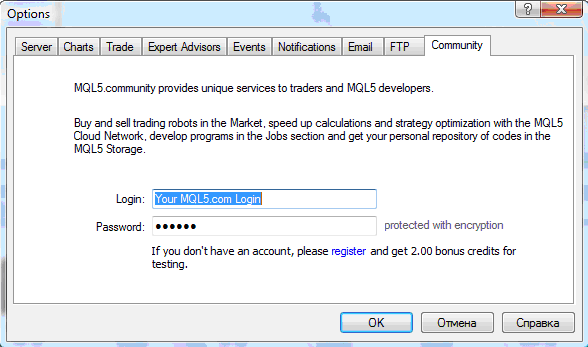
Login to MQL5 Account From MT5 CFD Platform - Trading CFDs Login to MQL5 Account - Login Account MQL5
To obtain to the above window, Navigate to " Tools", Next to " File, View " at tops left corner of MetaTrader 5 software. Click on Tools >>> Click on Options, the above panel will pop up.
Select " MQL5 Forum " as illustrated above, and then type your MQL5 Account Log in details: Your MQL5 Account Login & MQL5 Account Password.
Once this is complete you will now have complete access to the MQL5 CFDs Expert Advisors Market, and you can set up any of the Automated cfds trading robots on your MT5 cfds platform & begin automated cfd with MetaTrader 5 Expert Advisors & MetaTrader 5 CFD Robots.
MQL5 Account Registration
If you do not have an account with MQL5 you will need to first of all register an account with MQL5 before using that account to automate your trading on the MT5 software.




