MetaTrader 4 Oil Trading Software Setup
If you want to learn how to set-up the MT4 crude oil platform this oil trading guide explains the crude oil trading step by step guide on how to setup MetaTrader 4 Oil Trading Platform for beginners with examples.
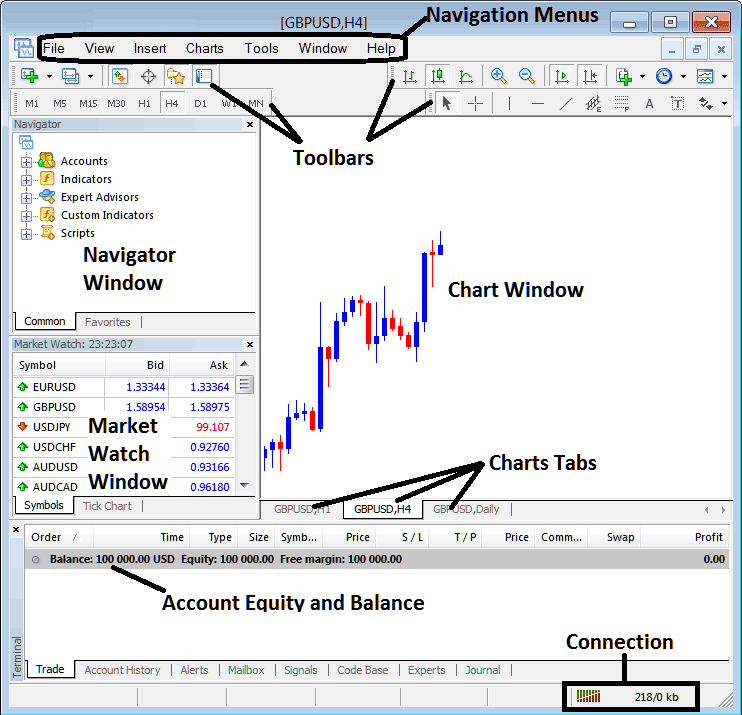
The following screen-shot below shows the main MT4 crude oil software inter-face. As a beginner trader trying to learn how to execute orders in online oil market, the main tool for trading the crude oil market is the MT4 crude oil trading platform software. This is the oil trading software that you will connect to your oil broker with and execute oil transactions & monitor your trading account balance.
The MT4 crude oil trading software for oil trading is provided for free through the various oil broker web sites. This MT4 software looks like the crude oil trading example explained below:
Learn MT4 Oil Software - MetaTrader 4 Oil Platform Setup - MT4 Oil Platform Guide for Beginners
Main Areas of this MT4 crude oil software as shown above are:
- Navigation Menus
- Toolbars
- Chart Window
- Navigator
- Market Watch
- Terminal
- Connection Bars
For this MetaTrader 4 Oil Trading Platform Setup guide we shall look at a brief introduction for each of these:
1. MT4 Navigation Menus MT4 Oil Platform Setup - MT4 Oil Platform Guide for Beginners
The MetaTrader 4 navigation menus are:
- File
- View
- Insert
- Charts
- Tools
- Window
- Help
These MetaTrader 4 menus are the main navigation menus which can be used to navigate the MT4 crude oil platform. As a oil trading beginner you can start by just clicking any of these MetaTrader 4 crude oil trading software navigation menus to familiarize yourself with the various button keys that are arranged as sub menus within these navigation menus.
These MetaTrader 4 crude oil trading platform navigation menus will be discussed in details in the next MT4 oil trading software setup tutorials about navigation menus.
2. MT4 Tool Bars MT4 Oil Platform Setup - MT4 Oil Platform Guide for Beginners
The MT4 tool bars are used to manipulate charts, either by placing indicators, line studies, change time frames and load a template from a list of saved templates on the MT4 platform.
These MetaTrader 4 tool bars will be discussed on other MT4 oil trading software setup tutorials which will outline each button on this tool bar and how to add and customize these MT4 tool bars.
3. MT4 Oil Trading Chart Window MT4 Oil Platform Setup - MT4 Oil Platform Guide for Beginners
MT4 Oil Trading Chart Panel is the main area where crude oil charts are displayed and one-can analyze the oil trend direction of a oil instrument whether up or down, place oil indicators for technical analysis & even place trading orders from these oil charts.
4. MT4 Navigator MT4 Oil Platform Setup - MT4 Oil Platform Guide for Beginners
MT4 Navigator will contain information about crude oil accounts, whether practice oil trading account or real account, this window will also have list of all the MetaTrader 4 indicators as well as Expert Advisors & scripts.
A trader can select which account to login by expanding the Accounts menu, choose an technical indicator by expanding the indicator menu or select an EA by expanding the Expert Advisor menu.
4. MT4 Market Watch MT4 Oil Platform Setup - MT4 Oil Platform Guide for Beginners
MT4 Market watch is used to show streaming quotes for oil. This can list as many quotes provided by your oil broker or a few selected by a oil trader. To save internet band width, right click inside the crude oil market watch window and select 'Hide All', so as to hide the MetaTrader 4 symbols that you are not transacting and save on internet band width.
6. MT4 Terminal MT4 Oil Platform Setup - MT4 Oil Platform Guide for Beginners
This is the panel that is like the bank account trade area for your oil trades, on this panel you can view your balance, profit and losses statement, equity, margin used also retrieve a copy of all your crude oil trades transactions history.
This will also list all open trade transactions and calculate all the profit & loss in real-time as the oil prices move upwards or downward.
7. MT4 Connection Bar MT4 Oil Platform Setup - MT4 Oil Platform Guide for Beginners
Red bars are for no connectivity, green bars show that there is connection to the servers & trade orders can be set. These MT4 connection bars should always be green when one logged into their demo oil trading account or real account.
These main areas form the MT4 Platform Setup tutorial and will be the main areas to be covered in detail in next learn MT4 crude oil platform guides. For now it is best to download MT4 platform and familiarize yourself with the MetaTrader 4 oil trading software interface.
Why MT4 Oil Trading Platform is Required for Placing Oil Trade Transactions with Brokers
MT4 crude oil platform is the software that's used to access the crude oil market & interpret these crude oil price movements using technical analysis. There are various reasons why a trader requires to use a good oil trading platform. A good oil platform can determine if a as a trader you make a profit or not.
So why does a trader need a good platform:
To connect to the Trading Server:
To place an order when trading online a trader needs to use a platform which will connect to the trading servers of their crude oil broker and allow them to open & close orders. Good oil platforms will connect with ease to the brokers' servers & allow traders to place orders at any time from computer.
To analyze oil charts using technical analysis
To place buy or sell order a trader needs to first analyze the direction of oil. This is why all good oil trading platforms provide technical tools such as crude oil price charts, trading indicators & various different time-frames from which trader can analyze crude oil price moves using chart time-frames of their choice.
MetaTrader 4 Oil Platform Setup - MT4 Oil Platform Guide for Beginners
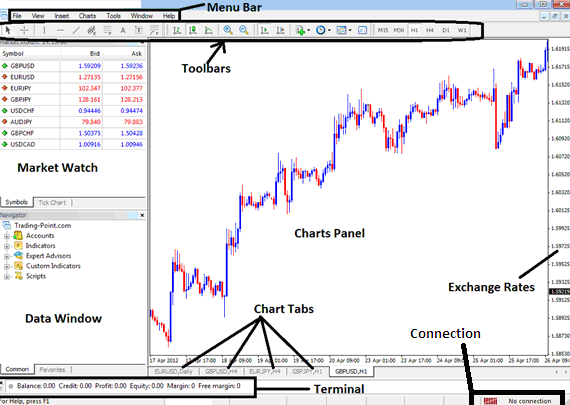
From the above MT4 crude oil platform interface, the summary of all information required by a trader is provided on this MT4 interface
- Connection - connection to the broker servers
- Charts - price charts which display oil prices
- Toolbars - tool bars to add tools and technical analysis technical indicators
- Market Watch - for displaying available financial instruments
- Data window panel - provides account information and other indicator data
- Exchange rates - shows current market crude oil price on a oil chart
- Menu bar - Shows all menu items on the MetaTrader 4 platform
MetaTrader 4 Oil Platform Setup - MT4 Oil Platform Guide for Beginners




