How to Add a Downloaded MT4 Oil Trading EA on MT4
How Do I Add a Downloaded MT4 Oil EA on MT4 Platform?
Trading Oil Install a Downloaded EA on the MT4 Software?
The procedure for installing a Downloaded Expert Advisor on MetaTrader 4 software is explained below:
How to Add a Downloaded Oil EA
If you download an automated crude oil trading Expert Advisor bot from a source on the internet, for example from www.tradeforextrading.com, then it is now on you desktop computer, to add it, follow the steps below in order to install the Automated Expert-Advisor on your MT4 crude oil trading platform:
Step1 : On File Menu of the Meta-Editor, Choose "Open"
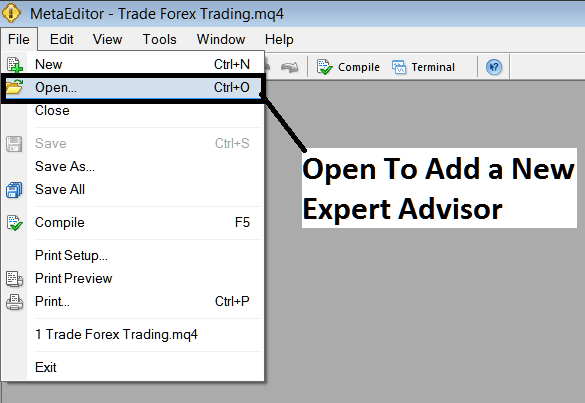
Oil Add Downloaded MT4 Oil EA on MT4 Software?
Step2: Locate the Download Folder from Popup window that appears as shown below
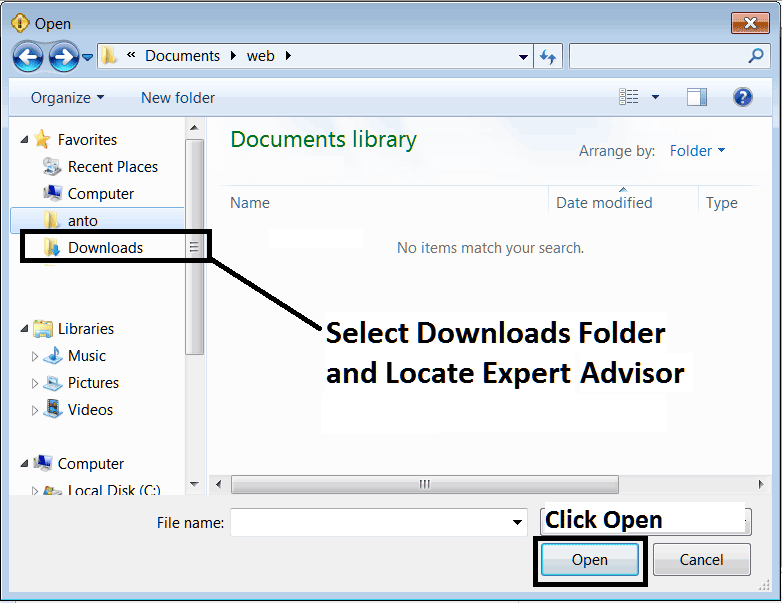
How Do You Add a Downloaded MT4 Oil EA on MT4 Software?
Step3: Once you Open the EA it'll be displayed on MT4 Meta Editor and then follow the procedure for compiling Oil Expert Advisor Bots in MT4, once it's compiled without errors, Rebegin Your MT4 Oil Platform and the automated EA crude oil trading bot will now be added to MetaTrader 4 platform and you can start to trade with it on your MT4 Crude Oil Trading Platform.
How Do You Add a Downloaded MT4 Oil EA on MT4 Platform




