Objects List on Charts Menu in MetaTrader 5
On the MT5 platform, charts menu options, the second button key is the "Objects" list button. Objects list is used to display a list of all object placed on the chart, this list will include objects such as indicators, forex trend lines, text labels & any object that has been placed on the MetaTrader chart.
objects list button key is shown and illustrated below.
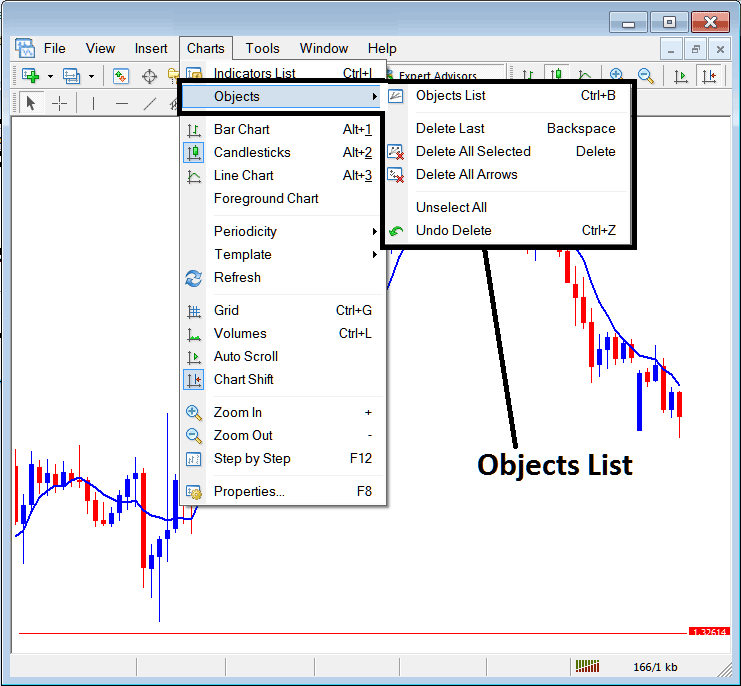
Objects List
The objects list menu has the following sub-menu options:
- Objects List
- Delete Last
- Delete All Selected
- Delete All Arrows
- Unselect All
- Undo Delete
The first option is the "Objects List"
To view all the object that are placed on Forex chart that you are trading, click the objects list button, this will show a list of all objects on the trading chart just like the in the forex trading example shown below:
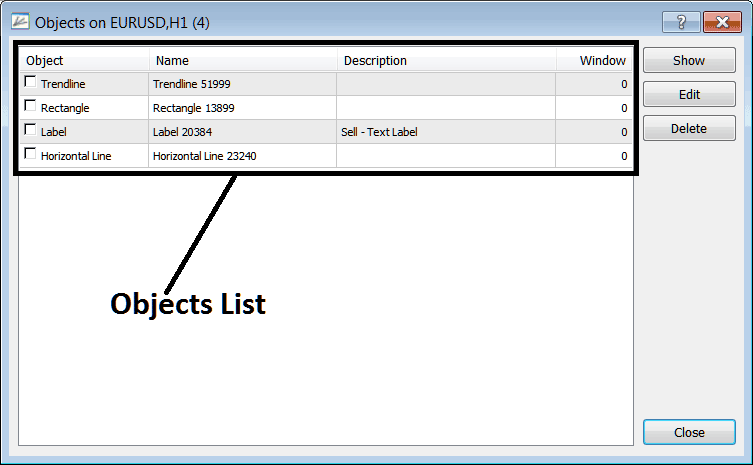
On this chart the objects listed above are placed on the chart. To delete all objects just select all object by clicking on then, checking the check box to the left, & click delete.
Show - This MT5 option will show the object selected and locate it on the trading chart.
Edit - Can be used to edit settings of any of the object within this "objects list"
The other submenu items on this objects list are:
- Delete Last - Delete the last object placed on the chart
- Delete All Selected - Select some objects by double clicking on them, then select This MT5 option to delete all selected.
- Delete All Arrows - Delete all arrows
- Unselect All - Unselect all objects that might have been selected on the charts.
- Undo Delete - Undo a delete & put back a deleted object on the chart
To view the objects list, directly using a short cut a trader can press keyboard MT5 buttons"Ctrl+B" as a shortcut to this menu.




