
How to Draw Trend Lines & Channels on Forex Charts
Sometimes support & resistances are formed diagonally in a similar way like a staircase. This forms a Forex trend which is a sustained movement in one direction either upward or downwards.
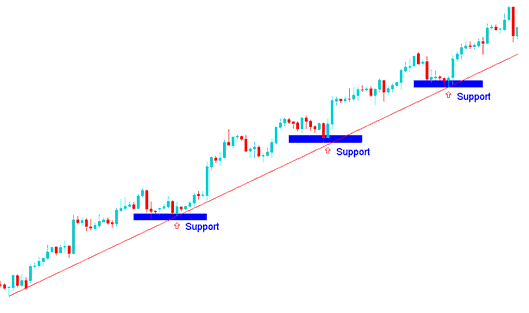
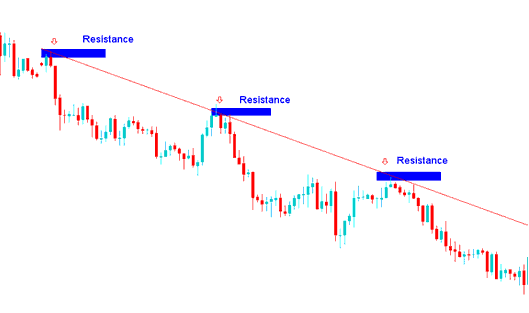
A forex trend line depicts the points of support & resistance for the price, depending on the direction of the FX market. For an upward moving forex market trend - trend line will shows the points of support and for a downward moving forex market trend - trend line will show the areas of resistance - Forex trend lines are mainly used by many traders to determine these resistance and support levels on forex trading charts.
A Forex Trend line is a slanting straight line that connects two or more price points and then extends into the future to act as a level of support or resistance. There are two types of forex trend lines: upward forex trend line and downward forex trend line. Forex trend line is an aspect of Forex trading technical analysis that uses forex line studies to try and predict where the next price move will head to. A trader must know how to draw and interpret signals generated by this trend line tool.
The basis of this forex technical analysis is based upon the idea that forex markets move in trends. Forex trend lines are used to show three things.
- The general direction of the market - up or down.
- The strength of the current forex trend - and
- Where future support & resistance will be likely located
If forex trend lines forms in a certain direction then the forex market usually moves in that direction for a period of time until a time when this forex trendline is broken.
Drawing these trend-lines on a forex chart shows the general trend of the forex market which can either be upwards or downwards.
Shown Below is example of how to draw these trend lines on forex trading charts
Course: How to Draw Upwards Forex Trend Line & Trade Upwards Forex Trend Move
Course: How to Draw Forex Downward Trend-Line and Trade Downward Forex Trend Move
The MT4 software provides forex charting tools for drawing these trend lines on forex charts. To draw forex trend lines onto a forex chart, forex traders can use the forex tools provided on the MetaTrader 4 software that is shown below.
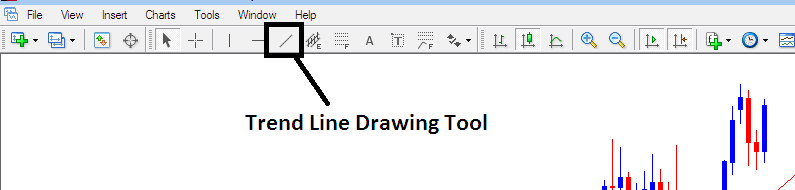
To draw forex trend-lines on a forex chart just click the Forex MetaTrader 4 Draw Trend Line Tools as shown above on the MetaTrader 4 platform technical analysis software and select point A where you want to start plotting the trend-line & then point B where you want the trend line to touch. You can also right click in trend line & on properties option choose option to extend ray by checking 'ray check box', if you do not want to extend the trend-line, then uncheck this option in your MetaTrader 4 platform. You can also change other forex trend line properties such as color and width on this property popup window of the trend line properties. You can download MT4 software and learn forex trend line technical analysis with it.
trend is your friend. Is a popular saying among traders because you should never go against it. This is most reliable method to trade Forex because once currencies start to move in one direction they can move in that particular direction for quite some time - therefore using this trend method presents opportunity to make profits from the forex market.
Principles of How to Draw Forex Trendlines
Use forex candle-stick charts
- The points used to draw the trendline are along the lows of the price bars in a rising forex market. An upwards bullish forex trend move is defined by higher highs & higher lows.
- The points used to draw the trend-line are along the highs of the price bars in a falling market. A downward bearish forex trend move is defined by lower highs & lower lows.
- The points used to draw forex trend lines are extremes points - the high or the low price. These extremes are important because a close beyond the extreme tells investors the forex trend of the currency pair might be changing. This is an entry or an exit signal.
- The more often a forex trend-line is hit but it is not broken, the more powerful its trading signal.
There are two main ways of trading this forex trend line technical analysis set-up:
- The Trend Line Bounce - Forex Trend Line Bounce
- The Trend-Line Break - Forex Trend Line Break
Technical Analysis Methods of Forex Trendlines
The forex trend-line bounce is a continuation forex trading signal where price bounces off this trend line to continue moving in the same direction. In a downward forex trend, the market will bounce downward after hitting this trend line level which is the resistance level. In an upward forex trend, the market will bounce upwards after hitting this trend line level which is the support level.
The forex trend-line break is a reversal forex trading signal where the market goes through the trend line & starts moving in the opposite direction. When a forex up trend is broken then sentiment of the forex market reverses and becomes bearish and when a forex down trend is broken then the forex market sentiment reverses & becomes bullish.
For very strong forex trends, after this forex trend line break trading signal, the price will consolidate for some time before heading in the opposite direction. For short term forex trends then this trendline break forex trading signal will mean price may reverse immediately.
In forex trading, both the trend line bounce and the trendline break that are used in technical analysis charts are based upon these trend line levels being support & resistance levels.
Entry, Exit & Setting stops:
This forex trend line trading method is used to determine good entry and exit points, protective stops are placed just above or below these trend lines. The forex trend line bounce is a low-risk entry method used by traders to place entry trades after price has retraced. Forex trades are setup along these trend line levels and a stop loss placed just above or below these trend lines.
The forex trend-line break is a crucial technical indicator of possible Forex trend reversal. When the trend line is broken the price starts move in the opposite direction. This provides an early exit signal for forex traders to exit their open trades and take profits. When there a penetration of these trend line levels, it is a signal that the forex price can begin heading in opposite direction.
Unlike other forex technical analysis indicators there is no formula used to calculate the trend line, this trend line formation is just drawn between two chart points on the forex chart.