Steps on How to Set a CFD Instrument Trade CFDs Trading on MT4
CFD Instrument CFD Trade Setup Tutorial for Beginner Traders
To setup a buy or sell cfd trade in MetaTrader 4 platform after learning what are cfd instruments and choosing which are the best cfd instruments to trade follow the steps listed on this tutorial.
Steps to Setup a CFD Instrument Trade
- Open MetaTrader 4 platform
- Open MetaTrader 4 Market Watch Window Panel shown below
- Select the CFD Instrument you want to trade
- Open the CFD Instrument Trade order and select "Buy" order or "Sell" order as shown below depending on what type of trade order (buy order or sell order) you want to open.
MT4 Market Watch Window
All the cfd instruments symbols available on the MT4 platform will be shown the same way as the cfd examples explained & illustrated below:
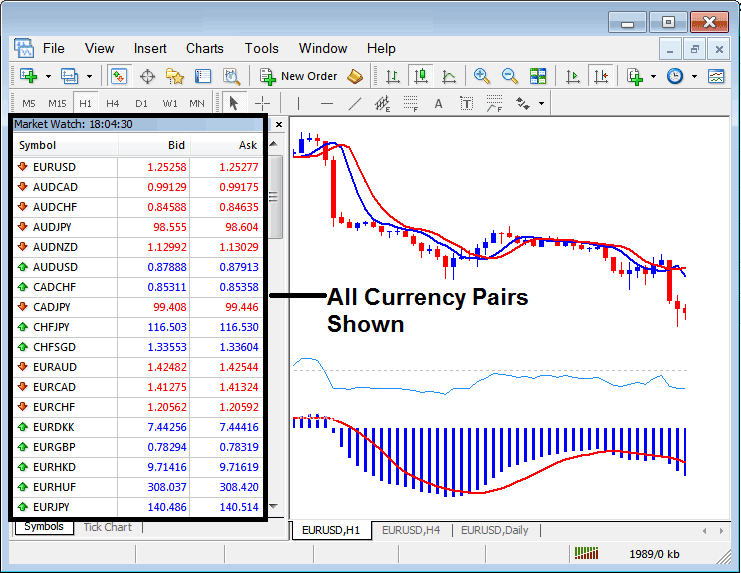
List of all Available CFD Instruments Trade Symbols Shown on the MT4 Platform
Opening Buy or Sell Order using Trade Order Window on MetaTrader 4
MetaTrader 4 cfds platform is the software that is provided by a broker to help cfd traders place their cfd instrument trade transactions.
Once you download and installs this MT4 cfd software on your computer you can then begin to trade in the online cfd market. All cfd instrument trade trade transactions are executed through this MetaTrader cfd platform. If you want to learn a cfd platform, MetaTrader 4 CFD Platform is a good platform to begin with.
To set these cfd instrument trade orders, open MT4, open a " cfd chart', right click on the ' cfd chart', select "New Order", then choose order you want to open - either sell order or buy order as shown below. (MetaTrader 4 Short Cut Keyboard Keys for MT4 new order window panel - Press F9 Key)
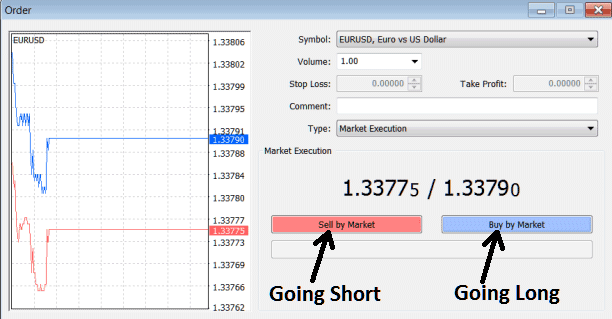
Opening Buy or Sell CFD Instrument Order using Trade Order Window on MT4




